Showing posts with label Technology. Show all posts

Inovasi dan Teknologi Terkini Kualitas Terbaik Acer

Dengan berkambangnya waktu yang semakin menuntut kita untuk terus mengenal dan mengetahui perkembangan technology yang sangat pesat, sudah sepantasnya kita mengenal Inovasi dan Teknologi Terkini Kualitas Terbaik Acer agar kita tau betapa canggihnya technology dari acer yang udah di keluarkan dalam waktu dekat ini.

Inovasi dari Acer memastikan fitur-fiturnya yang menjadikan produk lebih user-frendly, lebih kuat sesuai dengan kebutuhan dari para penggunanya. Sedangkan kualitas yang di tanamkan dari perusahaan Acer adalah dengan menyediakan teknologi terkini dan kualitas terbaik dengan cara melakukan pengujian menyeluruh untuk menghasilkan produk terbaik.

Inovasi dan Teknologi Terkini Kualitas Terbaik Acer, sudah tidak asing lagi dengan produk dengan nama Acer. Di Indonesia sendiri produk ini sudah memiliki jaringan yang sangat luas sehingga Acer memberikan inovasi dalam hal produk bukan hanya itu tapi juga menyediakan layanan CS ( Costumer Service ) yang dapat memuaskan pelanggan karena mampu memahami pelanggannya dengan kepuasan.

  • Keyboard dengan auto-illuminating backlit: Aspire S7 Series Ultrabook™ dilengkapi dengan light-sensing keyboard yang secara otomatis mengatur tingkat kecerahan untuk kenyamanan pengguna.
  • Acer TwinAir cooling : inovasi ini menggunakan dua kipas untuk menarik udara dingin dan mengeluarkan panas yang sudah digunakan pada Aspire S7 Series Ultrabook™.
  • ZoomPerfect touchpad: digunakan disebagian besar notebook Acer, Touchpad ini mendukung windows 8. Penggunanya sehalus layar sentuh. Teknologi sensor gambar terbaru meningkatkan sensitivitas dan akurasi.
Display

Display dari Acer menggunakan teknologi IPS yang memberikan tampilan yang konsisten, akurasi warna dan gambar bahkan dari sudut pandang yang sangat luas. Teknologi ini digunakan diberbagai produk Acer mulai dari smartphone CloudMobile S500 sampai dengan Aspire S Series Ultrabook™
Mekanik

Dual-torque hinge: Aspire S7 Series Ultrabook™ memiliki hinge yang unik dan telah dipatenkan untuk kenyamanan pada layar saat menggunakan touch sreen dan sekaligus memungkinkan layar untuk dibuka dalam posisi mendatar hingga 180 derajat.

Wireless
  • Digunakan pada smartphone CloudMobile S500, MHL memungkinkan untuk memutar 1080p Full HD palyback pada monitor atau TV yang kompatibel.
  • Acer signalUp™ adalah teknologi wireless yang terdapat diberbagai notebook Acer, desain dual-antenna panel-top yang inovativ memastikan anda mendapat koneksi wireless yang kuat bahkan bila anda di batas luar area.

Kualitas Acer

Uji goncangan

Dalam setiap produk Acer sudah di uji secara menyeluruh sehingga anda akan mendapatkan produk yang optimal untuk produktivitas anda.
Membarikan pengalaman sentuh terbaik

Untuk memastikan Aspire S7 Series Ultrabook™ dapat memberikan pengalaman sentuh terbaik. Dual-torque hinge digunakan untuk menjadikan layar sentuh menjadi stabil, sehingga jika anda menggunakannya tidak akan terjadi goyangan.
Pengujian sentuh
  • Menggeser jari di layar sentuh
  • Memukul
  • Menekuk layar sentuh
Pengalaman sehari-hari
  • Masa penggunaan hinge
  • Tekanan
  • Profil komponen thermal
  • Penggunaan pada temperature dan tingkat kemembapan tertentu
  • Pengukuran suara akustik
  • Port USB
Jenis kecelakaan
  • Jatuh
  • Guncangan pada penggunaan
  • Tumpahan
Demikian informasi tentang Inovasi dan Teknologi Terkini Kualitas Terbaik Acer, semoga dengan adanya informasi ini anda dapat mengerti bagaimana sebuah perusahaan teknologi menjamin kualitasnya dan mengerti bahwa sebelum sebuah produk dipasarkan produk itu telah di uji dengan baik, namun jika anda membeli sebuah produk dan produk baru itu rusak dalam jangka waktu pendek maka saat pemasaran mungkin terjadi sebuah kecelakaan yang sudah saya simpulkan di atas, terima kasih.


How Can Your Small Business Benefit from Mobile Technology?

The competition is very strong today . It is much harder for small businesses because they have to compete with their larger counterparts . This is the reason why small businesses should never by chance that he can Catapult for his business rivals . Moreover , it does not have a strong infrastructure and a large budget . It relies only on online presence to reach their goals. It is not just a website or social media sites , and mobile technology can help increase the productivity of small businesses and connect with customers .

The following are some effective ways that small businesses can benefit from mobile technology :

# 1 . Going Mobile with responsive design

Responsive design techniques assist in the completion of desktop -sized website and fit the mobile screen . Responsive design is a very smart move when it is ready for the mobile customer focus as well. And why would not it? Mobile will soon take over desktop internet usage. Only smart marketers take action, and use responsive design makes it credible and reliable .

# 2 . Start creating content for mobile

Mobile content can come in handy for small businesses. Mobile content is very effective when used in international sales calls and trade shows . People love to read e -books and flip books, and they can help to increase the conversion rate . These tools help in saving money on printing costs . Put the effort behind the creation of these tools will only be a small business knowledge and energetic appearance.

# 3 . Need for Mobile Apps

One of the main reasons why Smartphones and tablets are so popular today is because mobile apps . There are programs that help you to book a table at restaurants , there are also applications that users on the road to date. Mobile apps are a great variety, and invest in creating a mobile app is a good strategy if a small business does not operate on a tight budget. This mobile app will remain only inform users about new offers or special discounts from the company. In this way , a mobile app will be helpful in maintaining the importance of repeat customers .

# 4 . Rapid Reaction Using QR Codes

QR codes are relatively new to the market , and they are a very hot commodity. Almost every famous brand is using this matrix barcodes with the primary purpose of engaging customers. So why would a small business to stay out away from the fight It does not cost much to generate. EXCLUSIVE QR code Advertise press advertising and products . QR code Moreover, it should also ensure that people who scan these rules to forward to the relevant functional sites .

# 5 . SMS campaigns Still Matter

SMS campaigns are not outdated. In fact, many impressive bids in response to mobile devices with SMS campaigns. In addition, a text messaging campaign profitable. The biggest advantage of these campaigns is to market , even those customers who can not concentrate . Hold your smartphone or tablet This is the reason why small businesses should not have the power of SMS campaigns on the head .

The author lives in Orange County , California. She works as a small business mobile apps developers . In this article, she talks about the different ways in which small businesses can benefit from mobile technology.

9 The Causes Slow Computer Performance

As a computer user, of course we all want a good computer performance, fast response, smooth data access without having to wait a long time and so on. There is therefore good that we know what the cause or an effect with a slow computer. The following brief review 9 of the most frequent causes slow computer performance plus tips or solution.

1. Malware (virus, worm, trojan, dsb )

When computers are exposed to malware (viruses, worms, trojans, and the like), it's almost certain that okmputer performance will be slow. The virus will often use the computer's resources either RAM or CPU, as well as continuously monitoring computer activity. It is certainly very influential on the performance of other applications.
The solution to prevent this for users of Windows is to install antivirus and not just stop there, but regular antivirus updates. Schedule at least once a week if the computer is not online.

2. Spyware, Adware and The Like

If we often use the computer to the internet for, if not careful there is a possibility the computer may be infected with spyware. The effect may not be so great with the computer's performance, but it could have an effect on Internet access, and various things that disturb the comfort of surf and worse, important data (user, password, account, etc.) we can know by the creator of this spyware.
Solutions can install Anti-spyware is also constantly updated, just need to be sorted out which ones are not much use of my resources (resources) of our computer, because it is not uncommon Antispyware uses the CPU and Memory that is large enough. If antivirus is included, we do not need to add. Or use a portable version, and regularly scan for spyware only.

3. The number of applications running in the background

The more our computers with software, usually the more slow computer performance, although there is a relatively small effect and there are great. It is important to note when installing software, check whether an application is always running behind. This can be in the know with programs like Autoruns.
The solution in this case is important to use the software only, select a software if there is some similar software or have similar features and if there is a portable version of it then it could be an alternative. To reduce the program running in the background, use Autoruns, and disable unnecessary background applications. To to see whether the application is installed to run the program in the back, install software such as WinPatrol.

4. Hard disk (HDD) that have been age

When computers are still using the hard disk that is long enough (old), may be more than 5 years, then get progressively slower computer performance. To check, we can use free software HDD Tune and the like (read the article: Check the condition of your Computer Hard Disk). Normal SATA HDD usually average read access (read) about 70-90 MB / s. If for example the average HDD access below 50 MB / s then the performance will usually feels slow.
Solution when the hard drive is very slow, may be tried with full format (beware, data backup first). Although the old hard drive to it typically will not help much, so it is best to replace a new hard drive, and if you still want to use the old hard drive, use as a secondary hard drive only.

5. RAM / Memory mediocre

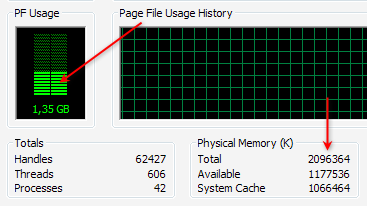
Many of the least amount of RAM / memory that we use can not be made a standard equal to one computer to another computer or even the operating system. Although when it will install Windows, there is a minimum specification of RAM, but the type of application that we use must also be taken into account. To check, just open the Task Manager and in the Performance check the PF Usage and also showing the total Physical Memory Physical Memory (RAM) and the remaining available (Available).

If we are not running any applications, but the rest of RAM is more than half, usually the computer's performance will be slow, then it should be checked any application that uses lots of memory (RAM), generally can be checked at the Process , Mem Usage column . If indeed we are barely adequate RAM (eg Windows XP with 512 MB of RAM or less, windows 7 with 1 GB of RAM), then the cheapest solution is to reduce the applications that consume a lot of memory. The best solution is to upgrade memory (RAM) (read: Know what RAM).

6. Conflicts applications or programs installed

Not infrequently two applications in the same category could result in conflict, further slowing computer performance. Signs of conflict forged the troubled computer after you install the software, whereas previously there was no problem. What often happens is usually in the category of conflict security software, such as antivirus.
For example we use 2 antivirus or more. Although some antivirus can run concurrently, but still not recommended, except for expert users or for trial. Not to mention when it still had to install other security software.
If there is an alternative variety of similar software, then if possible choose one that can represent, and superior in performance and results. Especially for the many types of software to access the resources or the operating system.


7. Selection Software inappropriate

Not a few people just went along with (trend) in the use of software, but there is actually a desirable feature in other software that is small and free. If we are indeed minimal computer specs or we want to work quickly, then choose the right software. Software with a large size is not always better and more appropriate for each of us. Here are some examples:
When we just want to burn data to CD / DVDs, exact solutions can use ImgBurn software that measures just about 5 MB or other free burning software that is relatively smaller than installing Nero Multimedia Suite which is about 354 MB.
When we work with compressed data (zip, rar), free software like 7zip that measures just about 1 MB should suffice, rather than install Winzip 15 measuring nearly 13 MB and is also not free (free compression software, etc.)
If using Photoshop 7 or CS1 / 2 is sufficient for the needs of graphics, then install Photoshop CS5 need difikir repeated, because the required specification is quite high, so it can work more slowly.

8. The amount of software installed

Although the software is installed is not running behind, but almost every software always adds an entry (data) to the registry, so that more and more software is installed is the size of the registry (windows) will also be greater. Because the registry will be accessible both when the computer is running and is already running, the size also affects the speed / response time was.
The solution is to use software that's required course, Uninstall software that is not important and use the uninstaller like Revo Uninstaller to make the process more thoroughly uninstallasi. To clean the software has been uninstalled on, can also use a variety of free Utilities.

9. Effects of excessive use of Windows

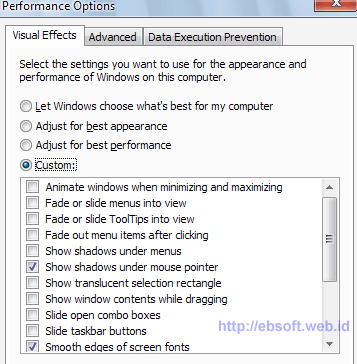
The use of Windows berlebihWindows Securities Xp, Vista and Windows 7 provides the option to use a display with various effects. If your computer has good specs, of the various effects is not a problem, but if you want faster performance, the effects of windows can be deactivated.
For example Windows XP, right-click My Computer, select the Advanced tab and click the Performance setting. We also put through the system tweaked to get the settings right and quickly, using software such as X-Setup Pro.


Actually, in addition to the above 9 things are still many other reasons, such as various service windows that are running are actually not necessary, selection and arrangement of hardware that is not optimal, the primary disk space (for example, drive C:) which limits or on the verge of running out, and others (ebsoft)

Mobile technology e-commerce to mobile banking

As with any business, banks too have felt the increase in sales-generation mobile technology, and turn back from that e-commerce solutions provider for the banking sector before. With the availability of the Bank in relation to financial services through smart phones, has been named the new banking technology in the banking sector, mobile reach the milestone.

Mobile banking and mobile banking and more popular among banks in the world, because it is proven to generate additional revenue while reducing cost and demanding technology needs of customers. Customer, the best solution, because the technology enables secure mobile banking service financial transactions, even on untrusted networks.

Planning with the advancement of mobile technology, customers, banks and their strategies on the road with a sense of security. In a survey of empirical studies have found that the profits of the banking sector by weight of the three types of people.

Target three mobile banking technology is:

Little kids: Adolescents in the overall analysis can contribute to the relevant income or financial contributions, but they were determined that the bank's economic future as part of this technology upgrade. School groups would be "entrepreneurs and professionals who are used throughout to calculate and certainly hope that the banks are dealing with a single click or touch. So should the banking sector, customer habits and behavior of their future success followed by long-term to develop mobile banking.

Young Professionals: stable is recognized by many of their financial situation, but then, this scenario is just a password with the bank group and professionals need to consider their behavior or activity to convert them into future loyal customers, they make an important contribution to get bank earnings. Young people put the effort and innovation as a technically demanding than the previous group, but also sensitive when it comes to monetary assets at financial institutions trust. They must develop a strategy for the bank, an investment in the future to allow the core group of viewers.

Business Customers: No doubt, entrepreneurs from around the recesses of the inspiration for the banking sector. They have the knowledge, time conscious and economically. This group of people looking for practical guidance to banks and financial transactions on their investments and funds. Mobile devices as a means to transfer funds between accounts of individuals is something that this group would be interested, and this demand is met, trust bankers and gain commitment of people in business class.

Help for all the endless demands of a diverse group of mobile banking solutions for the banking sector in the mCommerce-by-step restriction barriers, demographic and geographic intensity to overcome the causes of the banking sector for bank employees, arising from the quantity of heavy printing currency. Mobile banking is a safe choice when it comes to exchange transactions in the technology actually encouraged through cross-border financial transactions. Android, iPhone, Blackberry and Windows Mobile 7 is some of the best mobile operating systems in which the bank will be made in connection with mobile applications.

Computer Repair Advices and How To Find A Computer Shop

Computer problems can be tricky. Sometimes they occur without warning. Problems can arise surge, hardware failure, virus, etc. We believe everyone should have a backup system. Whether you subscribe to an online backup system, only the option to purchase, or external hard drive and install it, we must always keep a copy. Computers are cheaper, most of the time you have a new computer rather than being able to buy hundreds of dollars on computer repair services. Sometimes hardware failures can occur and that the computer can still work. This is a difficult situation, because the computer can spend a lifetime. If this happened is still very important to solve the problem immediately. Imagine visiting a friend or just a clever computer repair shop. Currently, the data service provides a free diagnosis.

In other cases, a hardware failure can be so obvious that there is no doubt that you have to go to computer store (the line across the screen, the computer is off, the hard drive is strange noises, etc..) The virus is also something you should know. We must have all antivirus systems proposals. Yes! Do you have two or three or more! One of the most anti-virus is enough! Some viruses are much more than appears on the screen when you try to do something. The virus is very annoying, but at least we know that your computer is infected and needs to take action as soon as possible. Most of the computer shop to fix the problem.

In some other cases, a laptop or a computer that can be a sign that you can check your computer against viruses. Maybe if you see a blue screen and rebooting several times when some software.

For someone who is not sure how much could cost a little when it comes to PC problem - it's easy to find food. This way, you know what it will cost and when he can expect to make repairs. Something that can be very important if you understand your own business or work only on a computer on a daily basis.

Computer workshop is important for all of us as technology continues to consume our lives. It is important that you seek to find a reliable computer near you for a repair. Reasonable, fair and able to explain what is happening on your computer if they do little on the web in advance. Not be fooled by websites that are full of technical jargon, and tons of stories in society. To find PC repair, you need balance. Someone who is professional, technical, and that the computer can be connected to each user. Be careful with the service you received and an explanation was satisfactory. To be in control of services and ensure that your computer has been done and that you understand what that means. When you save a reliable computer, you will always be those associated with any computer problem.

If not help, please visit http://www.southfloridapcrepair.com on any computer or service information technology Broward County in South Florida.

I Zica Daniel, owner of PC Repair South Florida, located in Fort Lauderdale, at: 4407 North Federal Highway, Fort Lauderdale, FL 33308, I worked with computers since the beginning of high school, he 20 years ago. My company is using a computer-related services in South Florida, including computer repair and service, office, server, web design, programming, cable, network. You can reach us at: 954-934-5342

Comparison of transportation management software for 3PL

A Transportation Management System (TMS) is positioned between an Enterprise Resource Planning (ERP) system and a shipping distribution model (e.g. TL shipping). There are three ways a shipper can implement a TMS:
  • Create a TMS in-house
  • Outsource the TMS function to a Third Party Logistics (3PL) provider
  • Use transportation management software
Large shippers that operate a shipping fleet usually create a TMS product in-house, while small shippers that do not own a fleet normally outsource the TMS function to a 3PL provider, or implement a TMS product - a type of logistics software that allows shippers to perform a freight audit as well as other logistics functions without staffing logistics experts, or contracting with a third party.

TMS Software versus 3PL
Depending on the wants and needs of the shipper, both TMS software and 3PL have unique advantages. When comparing a TMS product to a 3PL, the advantages of each-pertaining to cost, control, and carrier options-can be summed up as follows:

Cost
The cost of 3PL depends on the type of provider a shipper uses - a standard 3PL provider, a service developer, a customer adapter, or a customer developer. Standard 3PL providers and service developers offer a limited range of standard logistical services and a limited range of value-added logistical services, respectively. Therefore, they are not a logical choice for TMS management. That leaves customer developers and customer adapters, both of which perform comprehensive shipping management.
Compared to the cost of transportation management software, the cost of using a customer adapter or a customer developer can seem exorbitant. Although the management function is outsourced, it is still handled by logistics experts, who earn an average salary of $75,000-$90,000 a year.

Control
Outsourcing the TMS function to a 3PL provider relieves the shipper of controlling the function directly. This is what some shippers want, but for shippers preferring to perform their own freight audit and enjoy having control over the shipping process, using logistics software creates a happy medium. This is because it eliminates the cost of maintaining an in-house logistics department, yet it allows the shipper to control the TMS function within the company.

Carrier Options
TMS software supplies shippers with the largest number of shipping options. The number of shipping options that a 3PL provider considers is often unclear. Some providers use electronic posting systems that match available loads with available carriers, while others have beneficial business relationships with a select group of carriers, and use them for the majority of shipments. Using logistics software instead of 3PL is known to reduce shipping costs by ten percent in the first year, and the broader range of carrier options it supplies is one reason why.

Conclusion
Transportation management software provides a cost effective way for shippers to perform a freight audit along with other TMS functions, particularly when compared to maintaining a TMS product within the company. Outsourcing the TMS function to a 3PL provider is also less expensive than the in-house approach, but it does not offer the same flexibility as TMS software in terms of cost, control over the shipping process, and carrier options.

What are Facebook and cover how they are used?

In the world of social media has become the fastest growing media around the world during the past two years. Friends and family can see and hear everyone in the world second. Powers such as Facebook, Twitter, MySpace and Gtalk have done a lot with each other to increase their availability through the Internet connection. The world has become a global village, and reach out to anyone in the world, can be done in a fraction of a second.

The social media world itself is in progress and many applications and devices, are better equipped to users. Billions of users have joined these forums and programs that are constantly released, free to use. Most of them can be downloaded from various websites and is used at the pleasure of anyone.

Facebook is one of the most important of these social media sites. His fame grew in large areas and reach more people worldwide than any other platform social media. Add to Facebook is free, and each member has a profile page. Here you can share their thoughts with friends and family. It provides an opportunity for real-time chat, use it on someone's profile or on your own profile page. In this way, you always know how to have your friends and family, and plan future events.

Recently introduced Facebook an attractive way to focus on the wall of a person. The scenario is one of the functions introduced by the user. It uses Facebook roof, which can be downloaded from some sites. This includes a variety of styles and stunning images to make selections. The screenplay focuses not on the wall to be a banner with a sequence of events that happened in your life. If you are a Facebook user and you decide to switch to the Timeline, you will notice that your comments and status updates in the form of a series of events that took place in your life. This is not only very creative, but it is a good way to keep track of your activities as you progress through life.

Facebook blankets can be compared with the first few pages of a public newspaper. They can be downloaded directly to your schedule and used according to your wishes. In fact, you can give one of the subscribers, the cover image for people to download. It can be a great way to make money.

GPS fleet management The best solutions vehicle tracking system

The best fleet management solutions out there today is undoubtedly a vehicle tracking system. This technology was created for military purposes, but is now widely used for personal and organizational needs. Many companies already recognize the benefits of this technology and use GPS fleet tracking, optimizing logistics processes, and receiving benefits.

A business can benefit from GPS vehicle tracking in many ways. Moreover, this technology, the owner of any movement of the car and check the exact location at any time is known. Another thing is the ability to view statistical data on many factors, which can be identified using GPS tracking software to get collected. A company in the sign of the speed, direction of consumption, fuel and vehicle location. These facts help the company to draw conclusions and optimization of the transport process for appealing. GPS fleet tracking eventually an entirely new level of safety. This applies to vehicles and drivers as well. GPS tracking for vehicle location map feature. This feature is particularly useful in situations of car theft. Another great feature that has proven the importance of SOS functions. With the help of the system to be analyzed, and only detect the speed of the motor vehicle accident or emergency situation, and then sends signals to the hospital. This technology will clearly save lives.

If we focus on the technical side, we will see how the GPS Fleet Tracking works. A vehicle tracking system consists of three main components - a GPS tracking device in a vehicle or a fleet, the signal from the satellite and sends it to a central monitoring server typically uses GSM or CDMA, GPS tracking software specialized servers can receive, store and process information and ultimately, user interface, such information is intended to serve.

Even a vehicle tracking system is a unique technology. This is a powerful method to monitor the fleet during the trip. The company also offers the necessary information and statistical data for better decision making and rational. And travel safer for both drivers and vehicles. The only disadvantage of this technology can be filled with relatively high prices. While many companies use vehicle tracking systems say they are, the amount of money they spend on fuel and maintenance can be shrunk.

HTML5 Is The Best Language

HTML or Hypertext Markup Language offers plenty of comfort for the web developer and web master at creating Web pages. For the language used by developers that are not supported by a variety of platforms and even by many explorers. HTML is a huge improvement for Web development. With the passage of time new updates to this language and we now HTML5 much better than the existing version of HTML. As HTML4 also be used to create Web pages and applications. Another good point is that it is supported by all major browsers like Google Chrome, Firefox, Safari and Opera.

Why do we need HTML5?

A few years ago was not the most advanced technology to support language and that is why he came so late. Even the need for such language by the emergence of new gadgets such as smartphones and tablets. Although most of the work of other software and programming, because it needs time to sort of language that can meet these demands it. Before HTML5 web master should find their own way to meet this requirement. For example, at this time we do the video to play on the web page to a plug-in that can add support for Flash, QuickTime, etc. It is therefore to make this process easier for those HTML5 seems. Now, the various forms of rich media can be easily integrated into the code, and we are not dependent on another plugin.

Why do people switch to HTML5?

These are questions that may arise in your mind that if a webmaster is a feature of HTML5 by another plug-in, even why he went to the new code? In fact, it costs more to support its entire website by integrating the code. The answer to this question is that HTML5 is a single-use investment and unlike other plugins will not cost them. Yes, another plugin that webmasters have a prior, based on a monthly subscription and it will be something totally free for a lifetime of use. They do not even worry about it, although it runs on multiple platforms or is not compatible with different platforms such as laptops, computers, tablets and smartphones. Therefore, webmasters do not have to worry about developing multiple versions of a web page for various platforms.

HTML5 will soon revolutionize the coding of Web pages, applications and games.

Internet developments in the advancement of technology

along with rapid advances in technology, the Internet is a need for us in getting information and Internet URLs with a side dish in our meals, so we can surf the internet or surfing where we want

in this case all must already know what it is that the internet, with internet we can increase our knowledge and can easily find what we do not know about the very rapid technological progress this.

Internet is a network of computers that are connected to the rest of the world without knowing the limits of territorial, law and culture. Physically analogous to a spider web (the Web) that surrounds the globe and consists of the points (nodes) are interconnected.

According to Lani Sidhartha (1996): although the Internet is the physical interconnection of computer networks, but in general the Internet should be viewed as an information resource. Content of the Internet is information, can be thought of as a database or a very large multimedia libraries and
complete. Even the Internet is seen as the world in another form (maya) because almost all aspects of life in the real world is on the Internet such as business, entertainment, sports, politics and so forth.

Drew Heywood (1996) explained: the history of the Internet began in the late decades of the 60's when the United States Department of Defense (DoD) requires a new standard for internetworking communications. Standard that is capable of connecting
all types of computers in the DoD with a military contractor's computer, scientific research organizations and universities. This network must be robust, secure and lasting damage that can operate in conditions of disaster or a minimum
war.

1969 the Advanced Research Project Agency (ARPA) established duty conduct research computer network uses packet switching technology. The first network was built connecting the four points are: UCLA, UCSB, Utah, and SRI International. Until 1972, this network has linked more than 20 host and is referred to as ARPANet. ARPANet later became the backbone
Internetworking education institutions, research, industry and contractors primarily related to the military network (MILNET).

ARPANet start commercialized in 1986 by isolating the military network. National Science Foundation (NFS) and then finance the dismantling of backbone ARPANet a commercial Internet backbone and managed by the Advanced Network Services (ANS). Andrew S. Tanenbaum (1996): a big hand in the realization of the Internet is the incorporation of regional networks such as SPAN (network
high energy physics), BITNET (IBM mainframe network), EARN (European academic network and is also used in Eastern Europe) and supplemented with a number of transatlantic link that operates at 64 Kbps - 2 Mbps in 1988.

Internet users in January 1992 to form The Internet Society is promoting the Internet. CERN and MIT in 1994 to form the World Wide Web Consortium (W3C) as the sole authority for the development of WEB and the authorities set standards in it. The early decades of the 90s, WEB site (HTML-based information center on the Internet) only amounted to about 50 pieces of the URL (Uniform Resource Locator - the addressing system of information kiosks on the Internet) and contains only
text only.

According to Andrew S. Tanenbaum (1996): the end of 1990 has grown to three thousand and 200 thousand computer networks. Unity million in 1992 host connected to the Internet and there are dozens of backbone in 1995, hundreds of middle-regional networks, LAN tens of thousands, millions of hosts and users. Mencapa growth doubling every year (Paxton research data, 1996). WEB interface is now the most popular on the Internet that is able to display not only text but also graphics (drawings, photographs, animations), sound, video and virtual-dimensional (3D). Is expected in late 1998 has more than 10 million WEB site was built by an educational institution,
business, government, media, entertainment, military and so with more than 100 million users.

Tablets Computer Compared to Laptops, Notebook and Personal Computer

Tablet PC into a hot new technology. You can do something more than the smaller notebooks. This makes it easier for teams to carry with you in more places, opens more possibilities. Some eReaders you can download eReader and do much more.

What is a Tablet PC?

A Tablet PC is sometimes called a Tablet PC. Because no PC and a few tables that should be Linux-based tablet computer is the right word. Much larger than a mobile phone smaller than a laptop and if you buy an optional keyboard is not in the traditional sense.

What does it mean to use the keyboard?

This laptop is generally a flat screen with virtual keyboard that can be displayed on the screen. You can use your finger or stylus-type device to enter the picture. Most of the touch function lets you use your finger to "turn" pages, zoom and scroll.

Why is it called a Tablet PC?

In 2000, Microsoft has used the term "Microsoft Tablet PC" at the time, but the toolbar is built for business records. Tortured by usability problems and too heavy for extended use, it does not become consumers of the desired product.

Is the tablet computer become popular?

In addition, Apple is getting his private table. In 2010, Apple iPad purchased quickly and technology enthusiasts. This is the definition of a touch interface and is an integral part of the new tablet technology. And started running boards. At the Consumer Electronics Show in 2011, several companies have announced a competition with the iPad. These include RIM, Motorola, Samsung, Asus, Visio and others.

How, as a tablet PC?

The touch screen enables various PC keyboard does not work. Those who use a writing style often recognized. The touch screen tablet computers make basic easier because they are often very intuitive. With a stylus or finger painting and digital images easier than a mouse that adds pleasure to artists of all kinds.

What people like about the board?

Tablet PC is now more expensive than some laptops, but the price must fall. The lack of a keyboard means that the contents of the writing is slow, but it is a keyboard attached to the form. Because they are constantly touching the screen with your finger or stylus is a risk of harm. In addition, they often can be treated and can be damaged by impact and abuse. Although demand for tablet computer information should continue to increase until one team is shown.

iPad-management tips for eyes

When working on reviewing applications for "minor application of knowledge, I have a ton of reading and spent much time with my computer system to run write-ups in terms of computer vision syndrome in children .. I have no problem our youngest son was not found. I must be identified with it for me.

I tried to plan like that actually remembers it easily. Every 20 minutes away from the computer to select an item from twenty Yards. Set for 20 seconds. I found it very useful and really happy when my eyes started to tear and clearing.

When looking into that I can see that some of these studies that the human eye is much different than the printed word, because the resulting electronic images that we see on the laptop to respond. Can concentrate the power of looking to develop some concerns, such as double vision, headaches, loss of focus, as well as tired and burning eyes. In addition, some calls in the neck and shoulder discomfort.

Doctors now recommend the use of special computer glasses to reduce eye strain. This is actually a new type of optical created specifically for the needs of people and may help prevent eye injuries throughout life. Yes, posture and avoid a PC that will be used for a long time the day is also recommended. I'm glad to see the surgeon had to overcome this problem, and the search for treatment. Several years ago, I was told the eye doctor double vision and focus of the concerns that I get after running on a desktop computer. He suggested that the "parasite", help. Try as hard as I have never found a partner that does not make it more frustrating.

I see my grandchildren talking with his work as well as Adult attention, and safe in any case, including my daughter. The eyes of our children is important. We must continue to take action to make their vision with all the additional things that we can to achieve the absolute sign. Changing as fast as technological innovation, it is important to take seriously the task of backup. The possibility that we were a little before, which is actually on their home computers as well as the iPod, years spent specifically who sees the display as they learn to expand and work.

I walked out of the "22" me to solve it. In fact, it is longer than the sea breeze and the sun shining on my front porch holding me, a prisoner.

In addition to the above steps for easy control over the resolution and brightness can be very helpful. Another point of disposable protective mom or dad is learning how to adjust the settings in iPods children to ensure a pleasant experience.

Buy the latest Tablet PC, or wait for the latest release?

When you click on any item, the search for changes in the tablet computer, there's always the question of whether it is buying the latest Tablet PC is worth now, or hang out with the hope of something better in the near future. This article discusses the good and bad of each option, and some important questions to consider buying or menunnggu latest output

Do you really need a tablet PC right now, and if so, what?

This is probably the first question you should ask yourself - do you really need the latest Tablet PC right now? If you have in mind for your trip will be made within six months, then it may be best to hang in the near future - then you can make sure you buy the latest technology. However, if you currently have a use for them, and tablets on the market now in a position, your needs, there is no reason not to buy as soon as possible.

Do you know which Tablet PC you want?

If you are looking for a tablet of the company, then this should make your choice a little more clear. For example, if you have your heart set IPAD pad, then you should know that Apple tends to release an upgrade every year. When it was released about 12 months since the last generation of the iPad, then you probably do not wait too long before the latest out.

They are looking to purchase price for the store?

It can be a little gamble, but you might want to wait before buying the current generation. The Company periodically provides great discounts on the tray when they will publish the latest version. (This is to reduce equity holdings.) For example, in the month before the release of iPad 2, Apple is lowering prices on many first-generation iPad. If customers know that they do not need the new features of the iPad 2, it is economically sensible to wait for an iPad to purchase up before the new version.

Do you follow a special new feature?

If you are into your gadgets, then you may have specific functions that you have been looking for. For example, if you definitely want the Windows operating system - perhaps because you need a complete integration with your office PC. In this case, it would make sense to wait until the tablet manufacturers that use the operating system is released.

The market changes all the time! I can not keep up!

At the end of the day there is a very important reason why you do not have to wait to buy: technology is changing so fast that you just can not keep up! Whatever you buy today will be updated tomorrow, but also what you will buy next week tomorrow updated! In this case, you also can check the Tablet PC to your needs today and make your purchase now, rather than to keep Chasing Dreams "Tablet PC with the latest new technology."

Email delivery services beyond pure analysis of the e-mail

You can use an email delivery service if you are traveling or a long vacation. But have you ever thought of profit, because it's like a regular business tool?

You have the opportunity to check e-mail and share it online for you to check out one aspect of the convenience offered by the sender. But there is more time-saving features, you can use. Here are just a few that do not you think.

If you are a big company, and sometimes your e-mail sent to the office because we need is the signature of the letter can be signed by a reception at the office. Then he would sit at his desk until you pick it up in the lobby (or elsewhere). That stops at the desk on the way the company could have the chance to see what you get delivered. This is not good.

But there is also a chance for you, allowing you almost as anonymous treatment. If more than one person on your account in the transfer of mail service, you can automatically send an email to a row - by pressing the mouse button. Well, people who are not on the same account that you share, but they will have their own log-in, so they will not be able to send you something to do.

These are two other benefits that do not come from me so far. I just how profitable it is based online and can send email from my computer (not to mention do not have to use spam to go all the time) to see. But more like a total mail management. This. Stimulate and private, and in my opinion, far beyond what you get when you pass the Post Office only U. S. e-mail

So, for me at least, the benefits outweigh the fact that I sometimes go to the mailbox to pick up my desired letter. If you are on the computer almost every day anyway, just a few minutes to see what you decide and receive e-mails, do something with it. Everything can be managed from your own computer - in your virtual personal mailbox. It's not really any better than that - could it?

differences in serial ports and parallel ports

On the occasion of this post is inspired by the question one of the friends who asked what was the serial port and parallel port, from there I try to share on my friends and my friends who need hopefully what I have to say this could be an additional reference to a friend who read this article.

Port is a tool that can be used to connect computers with other peripherals. Interface that allows a PC to send or receive information to or from external devices, such as printers or modems. Generally consists of a PC serial port, parallel and several USB ports.

A. Serial Port

Serial Port or commonly known in the Indonesian language is the serial port is a port on a personal computer that serves to transmit one bit of information at one time unit. In the serial ports, shipment information does not allow for a lot sekalius. This is because in doing the data transfer, serial port usually works in series, such as COM 1 and COM 2. To use the serial port is now reduced. Use of the serial port has been replaced with USB and Firewire ports. As for the network (networking) function has been replaced with an Ethernet port. Here are some functions which connects between the serial port peripherals (devices) another computer with a motherboard, a liaison between the mouse with the motherboard, a liaison between the modem to the motherboard, and transmits the information in the form of bits of the mainboard to other devices.

B. Parallel Port

Parallel port or commonly known in the Indonesian language is the parallel port is a port on a personal computer that serves as a communication tool computer (motherboard) with external devices that are parallel. In a parallel port, the transfer of information can be done simultaneously so the information is sent more than a serial port. Commonly known as a parallel port printer port or Centronics port. The function of the parallel port is a connector motherboard with the old type of printer, Zip drive, some Scanners, Sound Cards, Web cams, Gamepads, Joystick, EPROM programming, SCSI devices through a parallel to SCSI adapter, an experiment with a TTL of 12 drivers, and External CD-R or CD-RW. In addition, the parallel port is also used as a simple test in the design of electronic equipment.

Computer Support For Pentium Based Computer

Pentium P5, the fifth generation of Intel chips was derived from the 80486 processor. This feature x86 superscalar architecture reduces the latency of address calculation, the processing unit faster floating, two pipelines full, 64-bit data bus, separate code and data caches. The latest Pentium with MMX technology was the mid-1990s, the integrated processor called a Pentium MMX. MMX, and large caches were implemented Pentium MMX. Pentium-rivals are AMD K5, Cyrix 6x86, Motorola 68060, PowerPC 601, Winchip C6, Rise MP6, NexGen Nx586, etc. Since the market share of this revolutionary processor more than 80%, network support for them is also widespread.

Characteristics of the Pentium P5

Compared to the 486-processors, the performance has improved significantly the Pentium. The execution speed of Pentium is almost twice the execution speed of 486 processors. It can be run more than 100 million instructions per second. With 75MHz clock, so the execution speed to over 125 million instructions per second. With the improvement as long as the PC need high quality support for Pentium P5 to solve problems.

Bus 64 data bits

The width of the Pentium data bus is 64 bits, double the 80 486 data bus. This feature doubles the bandwidth for reading and writing to memory. To store the code in the cache memory is also faster. Sometimes the data in tightly closed when two data paths are short, the computer will start to not work properly. To diagnose network problems such support could be very useful.

Superscalar architecture

Superscalar technology has been implemented in a Pentium processor for the first time in the history of microprocessor technology. This is the first superscalar processor. Superscalar technology uses two data paths or run pipes up to 2 instructions per clock cycle 1. The main line is designed for any kind of instructions, while the secondary pipeline may seek only simple instructions. To get the maximum benefit from double the pipeline, the optimized code to implement instructions to both pipelines are executed simultaneously. Technical support can be very useful in optimizing code.

Faster memory bus

Pentium processors in the system of control over the bus speed of 60MHz to 66MHz run, while 80 486 processors are used to drive the bus at 33MHz. So the performance is greatly enhanced in the Pentium. Pipelined burst cache is another feature that enables faster memory access.

Integrated Power Management

User management system is implemented in Pentium, regulate the operation of power management. This mode is optional in the 80486 processor.

Floating Point Unit

The floating point unit of the Pentium is much faster compared to the 80486th Some commands, such floating FMUL are 15 times faster. FXCH ST (x) a declaration could be parallel to one arithmetic or Load / Store instruction to execute FPU.

Code and data cache

Split Level 1 cache is used in Pentium. Memory is the data cache and 8KB cache code assigned to each. Separation of code and data cache reduces read and write conflicts. Since both are associative caches of the two channels, the access time and cost of implementation is reduced.

Microcode

The two pipelines can be used simultaneously with the Pentium microcode to allow the automatic repetition of instructions that perform iteration in each clock cycle. 80486 processor in an iteration in the three cycles is performed.

Hardware-based multiplier

the execution time of instructions MUL and IMUL is significantly reduced.

Network support for Pentium

some errors were discovered after Pentium was introduced in the market. Some floating-point divisions gave incorrect results. Some malicious programs could lead the system to crash, without special privileges. Some versions of Pentium-based computers with a high heat. To solve all the problems, computer support could be very effective. Many vendors support network are made solutions to Pentium PC.

Christie Hemme is a content writer pccarencure.com announced. Pccarencure provides 24x7 support network to millions of customers via remote IT support, by experienced technicians.

TIPS TO MAINTAIN EFFICIENT MOTHERBOARD

tips merawat motherboardAs hardware require air supply, the motherboard is always in contact with the outside air. The benefit is to reduce the heat generated by cipset. The motherboard can be damaged if the temperature is too high. Therefore, the supply air should flow well as a way of caring for a good motherboard.
But please note, not necessarily free to air free from dust. It could be the incoming air to the CPU carrying dust and stick to the motherboard. Dust on cipset can be dangerous when on leave. The reason is because the dust can withstand the heat so the temperature at cipset could have been higher. And this could have been made ​​cipset on the motherboard burned.

Therefore, the placement of the CPU should be noted, as much as possible put in place far from the dust. Besides the motherboard should also be treated by minimal cleaned once a month using a soft tool like a brush, cloth, spray air from the compressor and so on. Age motherboard can last a long time if ever in treating this motherboard, it should be done properly and regularly.

Tips to hang on a computer

tips mengurangi hang
Hang on a computer can sometimes annoy computer users. Because the work can be disrupted and less effective. Hang occurs when the computer work is not balanced by the performance.

Hang can be minimized, the way is to make computers as efficiently as possible. Here are some tips to reduce the computer hangs.

  1. Eliminate some programs that do not use. For example applications that are less useful, it should be deleted by the uninstall or remove the control panel> add or remove programs.
  2. Make sure there are not many active programs. How to find out is to see the icon on the bottom right corner of the desktop.
  3. do an antivirus scan. Usually one of the causes of hangs is the presence of active virus.
  4. do defragmenting the hard drive c:. kaan girlfriend click on the hard disk C: and select Properties. After appearing looks, select the tools tab and select defragment now. then do defragment, minimum once a month.

tips mengurangi hang

Of the four points above, you can do it all or not. But it can at least minimize the hang is happening on the computer. May be useful.

Intel Core i7 processor False Circulating

prosesor intel core i7"Intel Processor" is the best processor at the moment. The surplus is the processor performance is stable and heat resistant. Especially with the release of Intel Core i7 processor as the most advanced processors Intel has established a name as a manufacturer of processors

On March 9, 2010, PC Plus online tabloids reported about the release of Intel Core i7 processors false. This is justified by the manufacturer on Intel chips. The processor is circulated through a fake online store in America.

"Intel has been made aware of the existence of false i7-920 package on the market and are investigating how much and / or where they are sold. Examples of what we see is not an Intel product, but a forgery. The buyer should contact the place of purchase to ask for change and / or contact local law enforcement agency if the purchase was declined to give aid, "said Intel told The Inquirer in the UK.
Rate translation

According to the victim, processors have bought fake fake labels of the Intel factory, has a spelling error on the packaging and there is no guide its use.

So from that. For those of you who would buy a new processor, you should check first before buying. Hopefully this information useful.

How to Clean Virus / Malware Security Tools

Security Tools, also known by the name Security Tool is a rogue anti-spyware program that is spread through pop-ups, Trojans and malware websites. Security Tool Pro Police deployed as Windows or Green AV (Antivirus) 2009. Rogue anti-spyware programs are distributed through websites that simulates virus scan, then users are told to download software to clean computer.


Once installed, Security Tool will automatically be active every time you turn on your PC and log into Windows. Then he will start scanning your computer and give a false list of viral infections that occur on your computer. When you try to clean the infected files (but not), then you will be reminded to buy the software.


Beware, do not believe anything said by this evil software, and do not remove / delete files that it says has been infected, because in fact those files are files that are in good condition, and necessary.


Thus appearance of Security Tool.


To clean your computer of these software problems, then you need MalwareBytes Anti-Malware.

How do I clean the computer of the Security Tool?
  • Download MalwareBytes Anti-Malware.
  • Install file mbam-setup.exe.
  • To install it, just hit next and do not edit any of the options if you do not know anything.
  • After the installation is complete, MalwareBytes Anti-Malware will start automatically and will ask you to do a software update, so just press OK.
  • Open the Scan tab, select "Perform Quick Scan" and press "Scan".
  • MalwareBytes Anti Malware will immediately do a scan on your PC to locate malware, including Security Tool.
  • You will see a notice that reads "The scan completed successfully. Click 'Show Result' to display all objects found "after the scan is complete. Press OK.
  • Now press the "Show Results".
  • You will see a list of malware applications, including the Security Tool evil. make sure you have selected everything on the list and press the "Remove Selected".
  • Once MalwareBytes Anti Malware finished cleaning, you can close the program and make sure your computer in safe condition.

Is there among my friends who already dikerjain by malware Security Tool? If yes, then just do the above tips, and hopefully be able to immediately address the problems faced.
 
 
Blogger Templates