Showing posts with label Computer. Show all posts

Jaringan nirkabel
(Inggris: wireless network) adalah bidang disiplin yang berkaitan dengan komunikasi antar sistem komputer tanpa menggunakan kabel. Jaringan nirkabel ini sering dipakai untuk jaringan komputer baik pada jarak yang dekat (beberapa meter, memakai alat/pemancar bluetooth) maupun pada jarak jauh (lewat satelit). Bidang ini erat hubungannya dengan bidang telekomunikasi, teknologi informasi, dan teknik komputer. Jenis jaringan yang populer dalam kategori jaringan nirkabel ini meliputi: Jaringan kawasan lokal nirkabel (wireless LAN/WLAN), dan Wi-Fi. Jaringan nirkabel biasanya menghubungkan satu sistem komputer dengan sistem yang lain dengan menggunakan beberapa macam media transmisi tanpa kabel, seperti: gelombang radio, gelombang mikro, maupun cahaya infra merah.

Pada tahun 1970 Norman Abramson, seorang profesor di University of Hawaii, mengembangkan komputer pertama di dunia jaringan komunikasi, ALOHAnet, menggunakan biaya rendah seperti ham-radio. Dengan bi-directional topologi bintang, sistem komputer yang terhubung tujuh ditempatkan lebih dari empat pulau untuk berkomunikasi dengan komputer pusat di Pulau Oahu tanpa menggunakan saluran telepon.

"Pada tahun 1979, FR Gfeller dan U. Bapst menerbitkan makalah di Proceedings IEEE pelaporan percobaan jaringan area lokal nirkabel menggunakan komunikasi infra merah disebarkan. Tak lama kemudian, pada tahun 1980, P. Ferrert melaporkan percobaan penerapan kode satu radio spread spectrum untuk komunikasi di terminal nirkabel IEEE Konferensi Telekomunikasi Nasional. Pada tahun 1984, perbandingan antara infra merah dan CDMA spread spectrum untuk komunikasi jaringan informasi kantor nirkabel diterbitkan oleh IEEE Kaveh Pahlavan di Jaringan Komputer Simposium yang muncul kemudian dalam IEEE Communication Society Magazine. Pada bulan Mei 1985, upaya Marcus memimpin FCC untuk mengumumkan ISM band eksperimental untuk aplikasi komersial teknologi spread spectrum. Belakangan, M. Kavehrad melaporkan percobaan sistem PBX nirkabel kode menggunakan Division Multiple Access. Upaya-upaya ini mendorong kegiatan industri yang signifikan dalam pengembangan dari generasi baru dari jaringan area lokal nirkabel dan diperbarui beberapa lama diskusi di radio portabel dan mobile industri.

Generasi pertama dari modem data nirkabel dikembangkan pada awal 1980-an oleh operator radio amatir, yang sering disebut sebagai radio paket ini. Mereka menambahkan komunikasi data pita suara modem, dengan kecepatan data di bawah 9.600-bit / s, untuk yang sudah ada sistem radio jarak pendek, biasanya dalam dua meter band amatir. Generasi kedua modem nirkabel dikembangkan FCC segera setelah pengumuman di band eksperimental untuk non-militer penggunaan spektrum penyebaran teknologi. Modem ini memiliki kecepatan data yang diberikan atas perintah ratusan kbit / s. Generasi ketiga modem nirkabel ditujukan untuk kompatibilitas dengan LAN yang ada dengan data tingkat atas perintah Mbit / s. Beberapa perusahaan yang mengembangkan produk-produk generasi ketiga dengan kecepatan data di atas 1 Mbit / s dan beberapa produk sudah diumumkan oleh waktu pertama IEEE Workshop on Wireless LAN.

Adapun jaringan nirkabel dalam bidang sensor atau biasa disebut Jaringan Sensor Nirkabel (Wireless Sensor Network/WSN). Jaringan sensor nirkabel adalah jaringan perangkat nirkabel yang saling berhubungan yang tertanam dalam lingkungan fisik untuk mengukur kondisi lingkungan seperti suhu, suara, tingkat polusi, kelembapan, angin, dan sebagainya.

Five Reasons Being a Slow Computer

Your computer suddenly slow when being chased deadlines work? It definitely feels very annoying. But you do not need to rush emotions let alone to slam your computer. The cause slow computer can vary.

In general, a computer / laptop performance will decrease if the memory is approaching full capacity. When you run many applications at once, the main memory load increases. Main memory in a computer (usually RAM) is one of the most important components of a computer system in addition to the processor. The entire application is executed by the processor is taken from the main memory. So when you open too many applications simultaneously while the main memory capacity is small, it will affect overall computer performance

In addition, there are some other things that make the performance of your computer becomes slow. What is it?

1.   Too many add-ons in the browser
Application web browser is one of the most vital applications to support your work. You need this application to surf in cyberspace. Sometimes, for some reason you need additional Functions which by default is not owned by the browser you are using. The additional functions you can get through extensions or add-on. Be sure not to add an add-on that you do not need because it will also add to the burden of memory that ultimately will make the computer become slow
2.   Hard drive capacity thinning
When the capacity of your hard disk is approaching full, the computer will take a little longer to find the files you are looking for. So be advised only if the loading process will be a little slower
3.   main memory
As mentioned above, the main memory is one of the most important components in a computer system. All files required a certain program will be loaded into main memory before being called by the processor. If the main memory capacity is small, you do not should not open too many applications at the same time if you do not want your computer to hang
4.   Too many programs running
Multi-tasking has become a very helpful feature for users to work with multiple programs at once. However, it does not mean you can go around plenty of open applications. You must understand exactly about computer specs that you used before you open too many application programs
5. Virus
Viruses are the most frightening mush for computer users. In addition to stealing important files, computer virus programs will also make your computer becomes slow. Make sure you install proper antivirus and do not be lazy to update the antivirus

9 The Causes Slow Computer Performance

As a computer user, of course we all want a good computer performance, fast response, smooth data access without having to wait a long time and so on. There is therefore good that we know what the cause or an effect with a slow computer. The following brief review 9 of the most frequent causes slow computer performance plus tips or solution.

1. Malware (virus, worm, trojan, dsb )

When computers are exposed to malware (viruses, worms, trojans, and the like), it's almost certain that okmputer performance will be slow. The virus will often use the computer's resources either RAM or CPU, as well as continuously monitoring computer activity. It is certainly very influential on the performance of other applications.
The solution to prevent this for users of Windows is to install antivirus and not just stop there, but regular antivirus updates. Schedule at least once a week if the computer is not online.

2. Spyware, Adware and The Like

If we often use the computer to the internet for, if not careful there is a possibility the computer may be infected with spyware. The effect may not be so great with the computer's performance, but it could have an effect on Internet access, and various things that disturb the comfort of surf and worse, important data (user, password, account, etc.) we can know by the creator of this spyware.
Solutions can install Anti-spyware is also constantly updated, just need to be sorted out which ones are not much use of my resources (resources) of our computer, because it is not uncommon Antispyware uses the CPU and Memory that is large enough. If antivirus is included, we do not need to add. Or use a portable version, and regularly scan for spyware only.

3. The number of applications running in the background

The more our computers with software, usually the more slow computer performance, although there is a relatively small effect and there are great. It is important to note when installing software, check whether an application is always running behind. This can be in the know with programs like Autoruns.
The solution in this case is important to use the software only, select a software if there is some similar software or have similar features and if there is a portable version of it then it could be an alternative. To reduce the program running in the background, use Autoruns, and disable unnecessary background applications. To to see whether the application is installed to run the program in the back, install software such as WinPatrol.

4. Hard disk (HDD) that have been age

When computers are still using the hard disk that is long enough (old), may be more than 5 years, then get progressively slower computer performance. To check, we can use free software HDD Tune and the like (read the article: Check the condition of your Computer Hard Disk). Normal SATA HDD usually average read access (read) about 70-90 MB / s. If for example the average HDD access below 50 MB / s then the performance will usually feels slow.
Solution when the hard drive is very slow, may be tried with full format (beware, data backup first). Although the old hard drive to it typically will not help much, so it is best to replace a new hard drive, and if you still want to use the old hard drive, use as a secondary hard drive only.

5. RAM / Memory mediocre

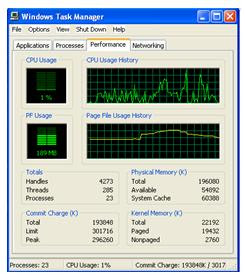
Many of the least amount of RAM / memory that we use can not be made a standard equal to one computer to another computer or even the operating system. Although when it will install Windows, there is a minimum specification of RAM, but the type of application that we use must also be taken into account. To check, just open the Task Manager and in the Performance check the PF Usage and also showing the total Physical Memory Physical Memory (RAM) and the remaining available (Available).
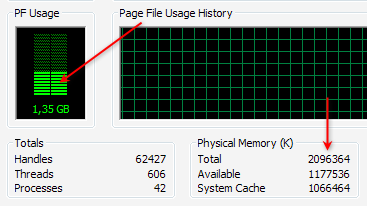
If we are not running any applications, but the rest of RAM is more than half, usually the computer's performance will be slow, then it should be checked any application that uses lots of memory (RAM), generally can be checked at the Process , Mem Usage column . If indeed we are barely adequate RAM (eg Windows XP with 512 MB of RAM or less, windows 7 with 1 GB of RAM), then the cheapest solution is to reduce the applications that consume a lot of memory. The best solution is to upgrade memory (RAM) (read: Know what RAM).

6. Conflicts applications or programs installed

Not infrequently two applications in the same category could result in conflict, further slowing computer performance. Signs of conflict forged the troubled computer after you install the software, whereas previously there was no problem. What often happens is usually in the category of conflict security software, such as antivirus.
For example we use 2 antivirus or more. Although some antivirus can run concurrently, but still not recommended, except for expert users or for trial. Not to mention when it still had to install other security software.
If there is an alternative variety of similar software, then if possible choose one that can represent, and superior in performance and results. Especially for the many types of software to access the resources or the operating system.


7. Selection Software inappropriate

Not a few people just went along with (trend) in the use of software, but there is actually a desirable feature in other software that is small and free. If we are indeed minimal computer specs or we want to work quickly, then choose the right software. Software with a large size is not always better and more appropriate for each of us. Here are some examples:
When we just want to burn data to CD / DVDs, exact solutions can use ImgBurn software that measures just about 5 MB or other free burning software that is relatively smaller than installing Nero Multimedia Suite which is about 354 MB.
When we work with compressed data (zip, rar), free software like 7zip that measures just about 1 MB should suffice, rather than install Winzip 15 measuring nearly 13 MB and is also not free (free compression software, etc.)
If using Photoshop 7 or CS1 / 2 is sufficient for the needs of graphics, then install Photoshop CS5 need difikir repeated, because the required specification is quite high, so it can work more slowly.

8. The amount of software installed

Although the software is installed is not running behind, but almost every software always adds an entry (data) to the registry, so that more and more software is installed is the size of the registry (windows) will also be greater. Because the registry will be accessible both when the computer is running and is already running, the size also affects the speed / response time was.
The solution is to use software that's required course, Uninstall software that is not important and use the uninstaller like Revo Uninstaller to make the process more thoroughly uninstallasi. To clean the software has been uninstalled on, can also use a variety of free Utilities.

9. Effects of excessive use of Windows

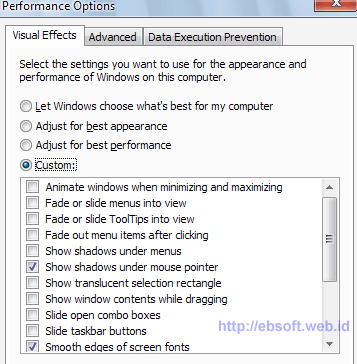
The use of Windows berlebihWindows Securities Xp, Vista and Windows 7 provides the option to use a display with various effects. If your computer has good specs, of the various effects is not a problem, but if you want faster performance, the effects of windows can be deactivated.
For example Windows XP, right-click My Computer, select the Advanced tab and click the Performance setting. We also put through the system tweaked to get the settings right and quickly, using software such as X-Setup Pro.


Actually, in addition to the above 9 things are still many other reasons, such as various service windows that are running are actually not necessary, selection and arrangement of hardware that is not optimal, the primary disk space (for example, drive C:) which limits or on the verge of running out, and others (ebsoft)

Computer Repair Advices and How To Find A Computer Shop

Computer problems can be tricky. Sometimes they occur without warning. Problems can arise surge, hardware failure, virus, etc. We believe everyone should have a backup system. Whether you subscribe to an online backup system, only the option to purchase, or external hard drive and install it, we must always keep a copy. Computers are cheaper, most of the time you have a new computer rather than being able to buy hundreds of dollars on computer repair services. Sometimes hardware failures can occur and that the computer can still work. This is a difficult situation, because the computer can spend a lifetime. If this happened is still very important to solve the problem immediately. Imagine visiting a friend or just a clever computer repair shop. Currently, the data service provides a free diagnosis.

In other cases, a hardware failure can be so obvious that there is no doubt that you have to go to computer store (the line across the screen, the computer is off, the hard drive is strange noises, etc..) The virus is also something you should know. We must have all antivirus systems proposals. Yes! Do you have two or three or more! One of the most anti-virus is enough! Some viruses are much more than appears on the screen when you try to do something. The virus is very annoying, but at least we know that your computer is infected and needs to take action as soon as possible. Most of the computer shop to fix the problem.

In some other cases, a laptop or a computer that can be a sign that you can check your computer against viruses. Maybe if you see a blue screen and rebooting several times when some software.

For someone who is not sure how much could cost a little when it comes to PC problem - it's easy to find food. This way, you know what it will cost and when he can expect to make repairs. Something that can be very important if you understand your own business or work only on a computer on a daily basis.

Computer workshop is important for all of us as technology continues to consume our lives. It is important that you seek to find a reliable computer near you for a repair. Reasonable, fair and able to explain what is happening on your computer if they do little on the web in advance. Not be fooled by websites that are full of technical jargon, and tons of stories in society. To find PC repair, you need balance. Someone who is professional, technical, and that the computer can be connected to each user. Be careful with the service you received and an explanation was satisfactory. To be in control of services and ensure that your computer has been done and that you understand what that means. When you save a reliable computer, you will always be those associated with any computer problem.

If not help, please visit http://www.southfloridapcrepair.com on any computer or service information technology Broward County in South Florida.

I Zica Daniel, owner of PC Repair South Florida, located in Fort Lauderdale, at: 4407 North Federal Highway, Fort Lauderdale, FL 33308, I worked with computers since the beginning of high school, he 20 years ago. My company is using a computer-related services in South Florida, including computer repair and service, office, server, web design, programming, cable, network. You can reach us at: 954-934-5342

Protects your PC on infected e-mail

Here are some simple rules to reduce the risk of playing into the hands of the virus infected e-mail
  1. Consider all business and personal emails as potentially dangerous. If ever in doubt, delete it!

  2. The "From:" field can be easily faked to look like it came from someone or a business you have dealt with. If a friend or business, that you deal with, gets a virus infection, it can make a copy of their email contact list, and send email to all people in that list.

  3. Be very suspicious of any email with no subject or "RE:" as the subject. A "RE:" should always have the subject of the reply following it.

  4. Be very suspicious of any email with no textual content and only a website link or attachment. Attachments can contain dangerous links to virus infected sites or an infected software executable. This is a file that once it is double clicked, can plant dangerous spyware or install malicious software.

  5. Do not click on a link or attachment unless you were expecting an email from the sending person.

  6. If you aren't sure about the email, it might be a good idea to call the sender. If they didn't send the email, ask them to quickly change their email account password and have their computer scanned for viruses and spyware. You should immediately delete the email.

  7. To reduce the risk of your email contact list from being used to perpetrate one of these nasty email crimes, make sure you use a strong password to protect your email account. Short and simple passwords are easy to break. Secondly, install a quality antivirus software on your computer. Most people, who come into our Fort Collins, Colorado office, with a virus infected computer, were using the antivirus software, provided free, by their Internet service provider. We have found that the "big" name antivirus companies produce weak antivirus protection and also slow down your computer.

Comparison of transportation management software for 3PL

A Transportation Management System (TMS) is positioned between an Enterprise Resource Planning (ERP) system and a shipping distribution model (e.g. TL shipping). There are three ways a shipper can implement a TMS:
  • Create a TMS in-house
  • Outsource the TMS function to a Third Party Logistics (3PL) provider
  • Use transportation management software
Large shippers that operate a shipping fleet usually create a TMS product in-house, while small shippers that do not own a fleet normally outsource the TMS function to a 3PL provider, or implement a TMS product - a type of logistics software that allows shippers to perform a freight audit as well as other logistics functions without staffing logistics experts, or contracting with a third party.

TMS Software versus 3PL
Depending on the wants and needs of the shipper, both TMS software and 3PL have unique advantages. When comparing a TMS product to a 3PL, the advantages of each-pertaining to cost, control, and carrier options-can be summed up as follows:

Cost
The cost of 3PL depends on the type of provider a shipper uses - a standard 3PL provider, a service developer, a customer adapter, or a customer developer. Standard 3PL providers and service developers offer a limited range of standard logistical services and a limited range of value-added logistical services, respectively. Therefore, they are not a logical choice for TMS management. That leaves customer developers and customer adapters, both of which perform comprehensive shipping management.
Compared to the cost of transportation management software, the cost of using a customer adapter or a customer developer can seem exorbitant. Although the management function is outsourced, it is still handled by logistics experts, who earn an average salary of $75,000-$90,000 a year.

Control
Outsourcing the TMS function to a 3PL provider relieves the shipper of controlling the function directly. This is what some shippers want, but for shippers preferring to perform their own freight audit and enjoy having control over the shipping process, using logistics software creates a happy medium. This is because it eliminates the cost of maintaining an in-house logistics department, yet it allows the shipper to control the TMS function within the company.

Carrier Options
TMS software supplies shippers with the largest number of shipping options. The number of shipping options that a 3PL provider considers is often unclear. Some providers use electronic posting systems that match available loads with available carriers, while others have beneficial business relationships with a select group of carriers, and use them for the majority of shipments. Using logistics software instead of 3PL is known to reduce shipping costs by ten percent in the first year, and the broader range of carrier options it supplies is one reason why.

Conclusion
Transportation management software provides a cost effective way for shippers to perform a freight audit along with other TMS functions, particularly when compared to maintaining a TMS product within the company. Outsourcing the TMS function to a 3PL provider is also less expensive than the in-house approach, but it does not offer the same flexibility as TMS software in terms of cost, control over the shipping process, and carrier options.

What are Facebook and cover how they are used?

In the world of social media has become the fastest growing media around the world during the past two years. Friends and family can see and hear everyone in the world second. Powers such as Facebook, Twitter, MySpace and Gtalk have done a lot with each other to increase their availability through the Internet connection. The world has become a global village, and reach out to anyone in the world, can be done in a fraction of a second.

The social media world itself is in progress and many applications and devices, are better equipped to users. Billions of users have joined these forums and programs that are constantly released, free to use. Most of them can be downloaded from various websites and is used at the pleasure of anyone.

Facebook is one of the most important of these social media sites. His fame grew in large areas and reach more people worldwide than any other platform social media. Add to Facebook is free, and each member has a profile page. Here you can share their thoughts with friends and family. It provides an opportunity for real-time chat, use it on someone's profile or on your own profile page. In this way, you always know how to have your friends and family, and plan future events.

Recently introduced Facebook an attractive way to focus on the wall of a person. The scenario is one of the functions introduced by the user. It uses Facebook roof, which can be downloaded from some sites. This includes a variety of styles and stunning images to make selections. The screenplay focuses not on the wall to be a banner with a sequence of events that happened in your life. If you are a Facebook user and you decide to switch to the Timeline, you will notice that your comments and status updates in the form of a series of events that took place in your life. This is not only very creative, but it is a good way to keep track of your activities as you progress through life.

Facebook blankets can be compared with the first few pages of a public newspaper. They can be downloaded directly to your schedule and used according to your wishes. In fact, you can give one of the subscribers, the cover image for people to download. It can be a great way to make money.

How To Find Registry Cleaner

Most people know the importance of the evaluation system registry cleaning software did not notice before making a purchase. There are many features you should look before you decide on this matter.

Great backup tool - A tool registry without a backup feature in his toolbox is a clear sign that you want to stay away from this program. The power that these programs should support the operations of the computer to change, the need for a backup. This way, you can always return to the starting point after playing with the program.

Search system optimization tools - An expert in optimization capabilities of the system can boot your files, the object browser, office extensions and optimization applications for managing Windows. If you are a lover of the game, these applications convoluted with the system registry keys and empty files, a program that quickly Reg set the click of a button to optimize.

Do a scan function optimally - One of the most overlooked features of the registry is the award-winning quality scanning application. You can select one of the best programs to register on the web to clean, but if the analysis is incorrect, then the purchase is virtually useless. Remember that these programs are used only for registry errors found on the first scan to correct the software.

Ability to integrate with the browser: Bonus - Often the best programs on the market are able to optimize the way your computer communicates with browsers such as IE, Firefox and Chrome (among others). This will only improve the user experience with these programs and allows the PC to run faster and error free.

Another point to keep in mind when looking for the first free registry cleaners on the market is not truly free. Most of these applications allow you to download their product and a free analysis of your computer to use it to show that there are huge errors on your hard drive. When you click a function to correct these errors, it is generally necessary to register the software - often associated with the purchase of this particular version of the product.

So, knowing that they are forced to at least something to pay for a program of upper register, there are few things sure to select the right one for you and your pocket. Make sure you try to get more than a registry cleaner to evaluate before making a purchase. In this way, the amount of features and benefits (some of which are above), compared with the price of membership. Certain periods of the trial offer where you can test their product for a limited time. Others force you to buy the product for the use of their software applications.

This information must educate the details of what to look for in your quest for the registry cleaner free top right. You will find that these steps for each product evaluation will help you find the right one for you and your PC. Most times it will register the first and only tool necessary for the optimal online experience to be.

I have an internet marketer over the last 4 years and I could not begin to number of software applications and that is uploaded and downloaded on my home PC and laptop to disclose. Without a guarantee of the right Registry Cleaner Free Best works. I knew a delay, accidents and ongoing problems with the functionality of my computer.

Best Trading Computer Compared to a Regular Computer

The argument always comes to mind when it comes to buying a computer trade - choose between a regular computer and the computer adjusted for trade. Hands down, would anyone who conducted the research that is also the best trading days in the PC market, compared with a normal computer. Every day traders who seriously learn quickly about stock trading, the computer is not just any ole ', will do the trick. You have a good PC with high-end components that are not found in traditional computer you see on the shelves of electronics stores is packaged.

Why trade in computer monitors setup 4-8

The best day trading computers always with at least four monitor ports. If you really looking for a better visual representation of what happens to get into the market to get, you can go as high as eight monitors. You need a graphics card that seven fifty-six monitors available through double or triple graphics card. Regular computer, you can find in department stores in the market you can only connect up to two monitors. Not to mention, they have a low quality video card model.

What are the components of the computer day trading?

There are several components that go into stock trading system that you can not find in a normal PC. You can guarantee that you will not Ivy Bridge, known as the i7-3770K, found in every computer shares in a department store. This is the processor of the current top-of-the-line and a must for traders today. Computer systems must also be a day trader with lots of RAM, solid state drives and high-end graphics card with support for multiple monitors come.

Tailor-made components for the commercial

So what is different from other components on the computer to trade in shares of the ordinary? Well for starters, his first class trading systems with cooling components, either air or liquid-equipped systems. Since that day traders use many applications and programs, including the time that the computer warms up quickly. It is therefore important to ensure high quality cooling system on your PC. Then there is the overclocking factor. This can be done by anyone, but just need a professional. If the processor overclock, so they work faster, runs over to clock cycle per second. If you are not careful you could end up with a fried computer, due to the fact that overclocking more energy consumption and thus generates more heat. When changing from a professional, will ensure that your computer does not blow themselves to act.

The best guide to buy a tablet pc

So set the tablet in an accident, but in the confusion, so you do not know whether the better choice? In this article, the correct choice of the optimal tablet computers is a valuable tip.

Before buying a Tablet PC is the first thing to decide is the cost.Designed to be the best to solve specific tasks, because it is different. Measure carefully to your needs, your budget is set. Then you need faster and better able to make the final choice to see that.

Advanced high-tech gadgets to talk to you if you're looking for, it's Apple's iPhone and iPad 2 might be worth watching. The tablets are very strong, handsome and very elegant and refined.

For a smaller amount do you a device size of the screen of the tablet to sacrifice, as the Samsung Galaxy Tab is that you should buy. That's perfect, function calls, if you're looking for a tablet computer, it will be a wise choice.

You totally "down" in a flexible and easy to adapt the device platform - if you want to experiment, you probably installed on the Tablet PC OS, Android want to think. OS is generally strong, Tablet PC can affect the impression created by the "Iron" is installed on your computer, most modern "raw" as feed them with the impression that all need to remember.

In general, because for a lot of books I bought a tablet PC, the network's success - We also have before you buy, tablet, type, and a diagonal screen and the main battery life is needed to to take into account. These factors, together with the Tablet PC experience more enjoyable, be sure to select the configuration is an excellent decision.

Despite this everything, you can fully are satisfied with the choice of a Tablet PC as you not after to think about buying a second addition would not mind - but the reader or the entire laptop - on the big screen smartphones and electronic communication, "Reading" a.Good reliability and a popular way for later, the number of people reached.

Given all the above you can choose what you want, your choice for a long time has a number of pleasant and profitable life in a difficult situation will help you. Therefore, the best choice in the market to determine.

Troubleshooting related to Graphics Cards

The graphics card is also called digital video card with an external card micro system to enhance their 2D and 3D scenes on the screen. This generates a stream of images displayed on the screen. It also increases the output capacity of the computer. You can connect the output directly to the TV. In addition, it also provides a graphical output using several maps of video monitors.

It is possible to display a graphics card can cause problems because it will crash, freeze, suspend, or sometimes it is a problem, that bad things there. It is difficult to find the error occurred when the certificate of such errors. This is mainly because the card can display the same mistake, in many problems. Below are methods to find the exact problem and solution.

Write down questions video graphics cards

the following is an important tool for solving problems with the video card.

Install the latest chipset drivers:

Chip is responsible for connecting the RAM, CPU and other devices more memory to the motherboard of the computer. Thus, to run properly must be updated for both. The problem could be notified when you update your operating system such as Windows XP, no driver update chipset. So, update your entire system for this to work.

Removing the old and reinstall the latest driver video display:

View the video card driver is required to work. If you have any problems with the video card, one of the first things you need to do is download the latest display drivers for your computer and remove the old and install the latest drivers for it. Even if the latest driver, you need to get up, because you may be a configuration problem with the driver.

Turn off the audio:

You might be surprised to know that the audio system is capable of suppressing the problem of video card. However, it is true that the video interface card driver advanced audio equipment, if video games. It crashes often a problem for the show to the driver. So this is an important step that must be resolved when the graphics driver.

The slow speed of the AGP

Accelerated Graphics Port (AGP) may be due to the instability of the model crashes video card. The high-speed data. Although these video cards of different output devices, the impact on the effectiveness of the video card. You can change the label on the BIOS settings on the motherboard or video card driver.

The use of a fan air blowing into the office computer

Problems with the video card may be overheating. There are so many chips on the motherboard, and some of them are heat sensitive, so they are not constantly running computer. You can open the machine and the fan blows air show the driver to work properly.

Mobile computing Based on sensitivity to context

Mobility of the platform is based on the new concept of environment was developed. Environment that is distracted by using the concept of context. It's been a Modeling Language based on text features mobility and behavior of the program. In other words, we can say that the intersection between life beyond the digital world of social, physical and mobile. This is the understanding of the complementary fields. Sites that can serve as a determining factor for the process of population, but it can be applied more context it flexibilité and mobile computing, and all companies are moving and bring the spirit of sharing. Approved development of all computer parts, or ubiquitous computing will deal with changes in bonding environment systems,

Context-aware mobile agents has some of the most suitable for the implementation of mobile applications. This type of computer system architecture that is a new trend for embedded systems and dialog databases and services they represent, communicate, capture, interrogate and integrate users. Context-Aware Computing offers millions of dollars annually in income opportunities for some industries, including travel and retail. Awareness of the importance of signing the context in which a device or service meets the user measures like - their research and support calls. It also enables effective communication in the user environment and analysis of models of behavior. As an information delivery function, alert, and advertising in a major commercial opportunity for all service providers and content providers. Technology means the driving experience among mobile phone users than a simple search for information, and even non-existing services, based on location, corresponding to vèstij only in the context of the time.

This program is completely different mobile computing simple sensors, based on what they see on smartphones. For example, users use a program like bark on their iPhones to find restaurants close to the kitchen and place and order. Context of knowing that the device has a feature that seems to know the restaurants that the user has selected in the past, users have food. Based on these settings in the device to make recommendations for restaurants that are nearby. It could even be shared with four other applications on the device.

Context, environmental awareness, such as wireless devices - environmental sensors, a radio frequency identification tags and smart phones communicate the presence, location updates and other information over the internet. Special software to capture and analyze data and return it to the networks necessary to reject the end device. According to the computer industry, a context that allows the phone to optimize power consumption based on things he knew about the daily life of the user.

Devices in the future to learn more about the users, the day where they are, what they want with the device will know love and hated users. Sensitivity to context is the main target of the screen and many sensory information to enterprise applications so that it can korelatif with local business. Finally there is something that can help people make decisions faster.

Endeavour has developed many successful programs for many Fortune 500 companies worldwide and is preferred the company of mobile application development by assessing their clients. Customers who approach seeks to deploy mobility solutions company was pleased with the service they receive. Leaders Satin newspapers in the United States, congratulated the onion seeking crew to work on applications in the paper that they successfully launched in the market to play with Google iStores. Endeavour produced some of the major programs of high quality mobile phone world, but you also have the knowledge and ability to integrate mobile solutions across multiple platforms.

Laptop with Inter Core i3-2330M 2.2Ghz, Dell Inspiron 14" i14RN-1364DBK

Wrapped in curvy edges and smooth lines, the Dell Inspiron 14R (model i14RN-1364DBK) seamlessly travels by your side without getting in your way. It features a 14-inch high-definition display and it weighs just over 5 pounds--perfect for taking along on your commute. The full-size, ergonomically designed keyboard gives your fingers plenty of space to stretch out and get comfortable.

Change is easy with this latest version of the Inspiron R laptop thanks to a variety of optional interchangeable lids that enables you to personalize your laptop for style or just change of mood in just seconds
It's powered by a second-generation Intel Core i3 dual-core processor, which provides breakthrough digital media management, content creation, and 3D gaming capabilities. Additionally, this Inspiron laptop includes award-winning Intel Wireless Display functionality, which enables you to enjoying great image clarity and sound on your HDTV without plugging in any cables.

This Dell laptop features two speedy USB 3.0 ports--the latest development in USB data transfer technology. Perfect for transferring and retrieving large files between your PC and an external hard drive or digital camera, USB 3.0 offers the speediest, most efficient way get what you need from external devices. (It also comes with a standard USB 2.0 port and a combo USB 2.0/eSATA port, plus the two USB 3.0 ports are backward compatible.)

You also get Dell's innovative Stage software, which provides a one-stop entertainment hub. Download movies, play games, listen to your favorite songs, and stream radio stations with RadioTime. Connect with friends on social networks, and view their Facebook and Flickr photos together in a real-time photo stream
It comes pre-installed with the Microsoft Windows 7 Home Premium operating system. You'll also experience new ways to deliver your best work with Office Starter 2010.

Spesifikation Details :
  • Intel Core i3 Processor 2.2GHz
  • 4GB DDR3 RAM
  • 640GB 5400RPM Hard Drive
  • 14-Inch Screen, Intel HD Graphics 3000
  • Windows 7 Home Premium
for information Detail Clik Here

TIPS TO MAINTAIN EFFICIENT MOTHERBOARD

tips merawat motherboardAs hardware require air supply, the motherboard is always in contact with the outside air. The benefit is to reduce the heat generated by cipset. The motherboard can be damaged if the temperature is too high. Therefore, the supply air should flow well as a way of caring for a good motherboard.
But please note, not necessarily free to air free from dust. It could be the incoming air to the CPU carrying dust and stick to the motherboard. Dust on cipset can be dangerous when on leave. The reason is because the dust can withstand the heat so the temperature at cipset could have been higher. And this could have been made ​​cipset on the motherboard burned.

Therefore, the placement of the CPU should be noted, as much as possible put in place far from the dust. Besides the motherboard should also be treated by minimal cleaned once a month using a soft tool like a brush, cloth, spray air from the compressor and so on. Age motherboard can last a long time if ever in treating this motherboard, it should be done properly and regularly.

Tips to hang on a computer

tips mengurangi hang
Hang on a computer can sometimes annoy computer users. Because the work can be disrupted and less effective. Hang occurs when the computer work is not balanced by the performance.

Hang can be minimized, the way is to make computers as efficiently as possible. Here are some tips to reduce the computer hangs.

  1. Eliminate some programs that do not use. For example applications that are less useful, it should be deleted by the uninstall or remove the control panel> add or remove programs.
  2. Make sure there are not many active programs. How to find out is to see the icon on the bottom right corner of the desktop.
  3. do an antivirus scan. Usually one of the causes of hangs is the presence of active virus.
  4. do defragmenting the hard drive c:. kaan girlfriend click on the hard disk C: and select Properties. After appearing looks, select the tools tab and select defragment now. then do defragment, minimum once a month.

tips mengurangi hang

Of the four points above, you can do it all or not. But it can at least minimize the hang is happening on the computer. May be useful.

Intel Core i7 processor False Circulating

prosesor intel core i7"Intel Processor" is the best processor at the moment. The surplus is the processor performance is stable and heat resistant. Especially with the release of Intel Core i7 processor as the most advanced processors Intel has established a name as a manufacturer of processors

On March 9, 2010, PC Plus online tabloids reported about the release of Intel Core i7 processors false. This is justified by the manufacturer on Intel chips. The processor is circulated through a fake online store in America.

"Intel has been made aware of the existence of false i7-920 package on the market and are investigating how much and / or where they are sold. Examples of what we see is not an Intel product, but a forgery. The buyer should contact the place of purchase to ask for change and / or contact local law enforcement agency if the purchase was declined to give aid, "said Intel told The Inquirer in the UK.
Rate translation

According to the victim, processors have bought fake fake labels of the Intel factory, has a spelling error on the packaging and there is no guide its use.

So from that. For those of you who would buy a new processor, you should check first before buying. Hopefully this information useful.

Knowing More Details Computer Specifications

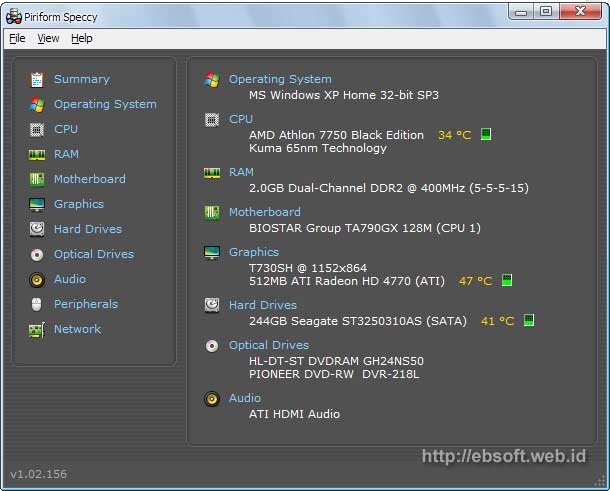
Any component that is in our computer? Sometimes we're curious to know what are more detailed specifications on the computer or laptop that we have. Even though Windows already provides this feature, but the information provided is still quite short, even if there is a detailed, sometimes confusing and uninformative. One of the free software alternatives that we tried was worth Spicy.

If we ever use Cleaner cleaning software, then the Spicy is another free software which is also made by the makers of Cleaner (Piriform). Actually quite a lot of similar software that provides complete information about your computer specs, but the Spicy provides an easy and informative display. So for the novice user would be greatly helped by this software.


What are the features Speccy? The information provided is divided into several categories that make it easier, namely:
  • System Operation
  • CPU
  • RAM (Memory)
  • Motherboard
  • Graphics
  • Hard disk
  • Optical drives
  • Audio
  • Peripheral
  • Network
As we see, computers in general consists of several main components of the above, includes the Software (Operating System) and hardware (other hardware). So if we want to know more of our computers, we should understand the above information, though only in outline. If we do not want to know the details, at least, we know from the Summary display.

In addition to providing detailed information about the components above, also provide information Speccy temperature components (CPU, HDD, Graphics) with attractive animation and enough to help us know the resource usage of its components.

Why do we need a software like this?

Maybe some of us say that such software is only needed by the technicians, admin, or computer users who are experts. But this opinion is not appropriate. If we have a computer / laptop, then at least we know in general the components in our laptop.

What if later there is damage, wanted to sell, upgrade, repair, or ask other things that we would not want to know an overview of our computer specs? Therefore, a time to know the detail or an overview of our computer specs.

Download and Specifications


In addition to the information provided is informative, the size of the installation of this software is also relatively small. Program size is only about 1:13 installasinya MB, and can run on Windows 2000 / XP / 2003 / Vista / Windows7 / XP64 / Vista64 / Windows7 64. Want to try? Please go directly to Halaman Download Speccy

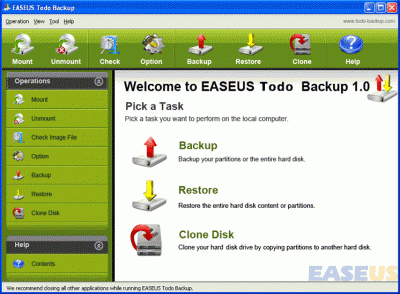
Backup and Restore Data With EASEUS Backup Todo

Computers can help us to work quickly and efficiently. However, there are many things that can interfere with the performance of computers that we use. For example, computers that we use to just having the system crash or hardware failure and sudden. While like this, it is useful also we have a backup of the system, partition, and disk, so that we do not need to lose all our hard work is stored in a computer crash or hardware failure is.

Indeed, wecan create a backup manually ,but this will take a long time because it is quite complicated to do . To make backups easier, we can use EASEUS Todo Backup. This free application is the best solution for backup and restore. This application comes with detailed instruction and wizards, which provides a fairly clear instructions for use. EASEUS Todo Backup allows you to create backups of system state, partition, and disk quickly and easily.


In addition to providing the ability to easily perform a restore when the computer crashes or you experience other problems, EASEUS Todo Backups can also help us to replace our hard disk without having to reinstall the operating system of our computer. EASEUS Todo Backup can be used on computers that use Windows 2000 Professional operating system, Windows XP, Vista, Windows 7 and Windows Server 2000/2003/2008.


How to Clean Virus / Malware Security Tools

Security Tools, also known by the name Security Tool is a rogue anti-spyware program that is spread through pop-ups, Trojans and malware websites. Security Tool Pro Police deployed as Windows or Green AV (Antivirus) 2009. Rogue anti-spyware programs are distributed through websites that simulates virus scan, then users are told to download software to clean computer.


Once installed, Security Tool will automatically be active every time you turn on your PC and log into Windows. Then he will start scanning your computer and give a false list of viral infections that occur on your computer. When you try to clean the infected files (but not), then you will be reminded to buy the software.


Beware, do not believe anything said by this evil software, and do not remove / delete files that it says has been infected, because in fact those files are files that are in good condition, and necessary.


Thus appearance of Security Tool.


To clean your computer of these software problems, then you need MalwareBytes Anti-Malware.

How do I clean the computer of the Security Tool?
  • Download MalwareBytes Anti-Malware.
  • Install file mbam-setup.exe.
  • To install it, just hit next and do not edit any of the options if you do not know anything.
  • After the installation is complete, MalwareBytes Anti-Malware will start automatically and will ask you to do a software update, so just press OK.
  • Open the Scan tab, select "Perform Quick Scan" and press "Scan".
  • MalwareBytes Anti Malware will immediately do a scan on your PC to locate malware, including Security Tool.
  • You will see a notice that reads "The scan completed successfully. Click 'Show Result' to display all objects found "after the scan is complete. Press OK.
  • Now press the "Show Results".
  • You will see a list of malware applications, including the Security Tool evil. make sure you have selected everything on the list and press the "Remove Selected".
  • Once MalwareBytes Anti Malware finished cleaning, you can close the program and make sure your computer in safe condition.

Is there among my friends who already dikerjain by malware Security Tool? If yes, then just do the above tips, and hopefully be able to immediately address the problems faced.

Opera on Sony BRAVIA

Now starting to appear a number of electronic devices that immerse the internet facilities in it. For example, in LCD TVs and multimedia players.

It was adopted also by Sony. They launched a Sony BRAVIA television sets and Blu-Ray disc player that has the ability to cruise the internet. How, through the Opera-based browser that is embedded in both these devices.

Sony take advantage of Opera Software Development Kit (SDK) open standard that easily customizable as needed. This platform was created specifically by Opera for TV sets and Blu-Ray player. As a result, Opera allows web interface and widgets that bring full and HTML5 standards, HbbTV, and OIPF.

"This ability to address key initiatives hybrid broadcast-broadband in many markets makes us compatible with Sony," said Christen Krogh (Chief Development Officer, Opera Software).

Through the presence of the Opera browser SDK based on LCD TV sets and Blu-Ray player Sony, the user can feel the sensation of "surfing" on the big screen. They can enjoy video on-demand service, subscribe to the latest series, while still able to connect to social networking.

"It will remain committed to making [Opera] more accessible in a variety of devices,"said Krogh.
 
 
Blogger Templates