Jaringan nirkabel
(Inggris: wireless network) adalah bidang disiplin yang berkaitan dengan komunikasi antar sistem komputer tanpa menggunakan kabel. Jaringan nirkabel ini sering dipakai untuk jaringan komputer baik pada jarak yang dekat (beberapa meter, memakai alat/pemancar bluetooth) maupun pada jarak jauh (lewat satelit). Bidang ini erat hubungannya dengan bidang telekomunikasi, teknologi informasi, dan teknik komputer. Jenis jaringan yang populer dalam kategori jaringan nirkabel ini meliputi: Jaringan kawasan lokal nirkabel (wireless LAN/WLAN), dan Wi-Fi. Jaringan nirkabel biasanya menghubungkan satu sistem komputer dengan sistem yang lain dengan menggunakan beberapa macam media transmisi tanpa kabel, seperti: gelombang radio, gelombang mikro, maupun cahaya infra merah.

Pada tahun 1970 Norman Abramson, seorang profesor di University of Hawaii, mengembangkan komputer pertama di dunia jaringan komunikasi, ALOHAnet, menggunakan biaya rendah seperti ham-radio. Dengan bi-directional topologi bintang, sistem komputer yang terhubung tujuh ditempatkan lebih dari empat pulau untuk berkomunikasi dengan komputer pusat di Pulau Oahu tanpa menggunakan saluran telepon.

"Pada tahun 1979, FR Gfeller dan U. Bapst menerbitkan makalah di Proceedings IEEE pelaporan percobaan jaringan area lokal nirkabel menggunakan komunikasi infra merah disebarkan. Tak lama kemudian, pada tahun 1980, P. Ferrert melaporkan percobaan penerapan kode satu radio spread spectrum untuk komunikasi di terminal nirkabel IEEE Konferensi Telekomunikasi Nasional. Pada tahun 1984, perbandingan antara infra merah dan CDMA spread spectrum untuk komunikasi jaringan informasi kantor nirkabel diterbitkan oleh IEEE Kaveh Pahlavan di Jaringan Komputer Simposium yang muncul kemudian dalam IEEE Communication Society Magazine. Pada bulan Mei 1985, upaya Marcus memimpin FCC untuk mengumumkan ISM band eksperimental untuk aplikasi komersial teknologi spread spectrum. Belakangan, M. Kavehrad melaporkan percobaan sistem PBX nirkabel kode menggunakan Division Multiple Access. Upaya-upaya ini mendorong kegiatan industri yang signifikan dalam pengembangan dari generasi baru dari jaringan area lokal nirkabel dan diperbarui beberapa lama diskusi di radio portabel dan mobile industri.

Generasi pertama dari modem data nirkabel dikembangkan pada awal 1980-an oleh operator radio amatir, yang sering disebut sebagai radio paket ini. Mereka menambahkan komunikasi data pita suara modem, dengan kecepatan data di bawah 9.600-bit / s, untuk yang sudah ada sistem radio jarak pendek, biasanya dalam dua meter band amatir. Generasi kedua modem nirkabel dikembangkan FCC segera setelah pengumuman di band eksperimental untuk non-militer penggunaan spektrum penyebaran teknologi. Modem ini memiliki kecepatan data yang diberikan atas perintah ratusan kbit / s. Generasi ketiga modem nirkabel ditujukan untuk kompatibilitas dengan LAN yang ada dengan data tingkat atas perintah Mbit / s. Beberapa perusahaan yang mengembangkan produk-produk generasi ketiga dengan kecepatan data di atas 1 Mbit / s dan beberapa produk sudah diumumkan oleh waktu pertama IEEE Workshop on Wireless LAN.

Adapun jaringan nirkabel dalam bidang sensor atau biasa disebut Jaringan Sensor Nirkabel (Wireless Sensor Network/WSN). Jaringan sensor nirkabel adalah jaringan perangkat nirkabel yang saling berhubungan yang tertanam dalam lingkungan fisik untuk mengukur kondisi lingkungan seperti suhu, suara, tingkat polusi, kelembapan, angin, dan sebagainya.

Tips Menghapus Virus ShortCut

Dalam dunia komputerisasi tidak menutup kemungkinan terinveksi oleh virus yang selalu membuat kesal seorang User (pengguna) bahkan mungkin seorang user pesimis dengan virus yang selama ini di alami bahkan seorang user sering kali bertanya-tanya Anti Virus apa yang ampuh untuk mengatasi virus yang selama ini mengganggu dalama komputer/laptop yang mereka miliki, dalam hal ini saya mencoba untuk memberi solusi atas keluhan virus shortcut yang selama ini mengganggu komputer anda semua.

Tampilan seperti ini yang sering membuat seorang user (pengguna)
Entah itu pada Laptop ataupun isi FlashDisk anda.

Berikut ini adalah 8 langkah praktis untuk Menghilangkan virus yang mampu mengubah
folder yang ada di dalam USB flash disk menjadi shortcut tersebut:
  1. Nonaktifkan ‘System Restore’ untuk sementara selama proses pembersihan.
  2. Putuskan komputer yang akan dibersihkan dari jaringan.
  3. Matikan proses virus yang aktif di memori dengan menggunakan tools ‘Ice Sword’. Setelah tools tersebut  terinstal, pilih file yang mempunyai icon ‘Microsoft Visual Basic Project’ kemudian klik ‘Terminate Process’. Silahkan download tools tersebut di http://icesword.en.softonic.com/
  4. Hapus registri yang sudah dibuat oleh virus dengan cara:
    • Klik menu [Start]
    • Klik [Run]
    • Ketik REGEDIT.exe, kemudian klik tombol [OK]
    • Pada aplikasi Registry Editor, telusuri key [HKEY_CURRENT_USER\Software\Microsoft\Windows\CurrentVersion\Run]
    • -. Kemudian hapus key yang mempunyai data [C:\Document and Settings\%user%].
  5. Disable autoplay/autorun Windows. Copy script di bawah ini pada
  6. program notepad kemudian simpan dengan nama REPAIR.INF, install file tersebut dengan cara: Klik kanan REPAIR.INF –> INSTALL
    [Version] Signature=”$Chicago$” Provider=Vaksincom [DefaultInstall]

    AddReg=UnhookRegKey DelReg=del [UnhookRegKey] HKLM,

    Software\CLASSES\batfile\shell\open\command,,,”"”%1″” %*” HKLM,

    Software\CLASSES\comfile\shell\open\command,,,”"”%1″” %*” HKLM,

    Software\CLASSES\exefile\shell\open\command,,,”"”%1″” %*” HKLM,

    Software\CLASSES\piffile\shell\open\command,,,”"”%1″” %*” HKLM,

    Software\CLASSES\regfile\shell\open\command,,,”regedit.exe “%1″” HKLM,

    Software\CLASSES\scrfile\shell\open\command,,,”"”%1″” %*” HKCU,

    Software\Microsoft\Windows\CurrentVersion\Policies\Explorer, NoDriveTypeAutoRun,0x000000ff,255 HKLM,

    SOFTWARE\Microsoft\Windows\CurrentVersion\policies\Explorer, NoDriveTypeAutoRun,0x000000ff,255
  7. Hapus File induk dan file duplikat yang dibuat oleh virus termasuk di flash disk. Untuk mempercepat proses pencarian, sobat dapat menggunakan fungsi ‘Search’. Sebelum melakukan pencarian sebaiknya tampilkan semua file yang tersembunyi dengan mengubah pada setting Folder Options.
  8. Jangan sampai terjadi kesalahan pada saat menghapus file induk maupun file duplikat yang telah dibuat oleh virus. Lalu hapus file induk virus yang mempunyai ciri-ciri:
    • Icon ‘Microsoft Visual Basic Project’.
    • Ukuran File 128 KB (untuk varian lain akan mempunyai ukuran yang bervariasi).
    • Ekstesi file ‘.EXE’ atau ‘.SCR’.
    • Type file ‘Application’ atau ‘Screen Saver’.
    Kemudian hapus File duplikat shortcut yang mempunyai ciri-ciri:
    • Icon Folder atau icon
    • Ekstensi .LNK
    • Type File ‘Shortcut’
    • Ukuran file 1 KB
    Hapus juga file yang .DLL (contoh: ert.dll) dan file Autorun.inf di flash disk atau folder yang di-share. Sementara untuk menghindari virus tersebut aktif kembali, hapus file induk yang mempunyai ekstensi EXE atau SCR terlebih dahulu baru kemudian hapus file Shortcut (.LNK).
  9. Tampilkan kembali folder yang telah disembunyikan oleh virus. Untuk
  10. mempercepat proses tersebut, silahkan download tools UnHide File and Folder di http://www.flashshare.com/bfu/download.html.
    Setelah diinstall, pilih direktori [C:\Documents and settings] dan folder yang ada di flash disk dengan cara menggeser ke kolom yang sudah tersedia. Pada menu [Attributes] kosongkan semua pilihan yang ada, kemudian klik tombol [Change Attributes].
  11. Install security patch ‘Microsoft Windows Shell shortcut handling remote code execution vulnerability-MS10-046′. Silakan download security patch tersebut di http://www.microsoft.com/technet/security/Bulletin/MS10-046.mspx
Seperti biasa, untuk pembersihan secara optimal dan menecegah infeksi
ulang, sebaiknya install dan scan dengan antivirus yang up-to-date dan
sudah dapat mendeteksi virus ini dengan baik.

Five Reasons Being a Slow Computer

Your computer suddenly slow when being chased deadlines work? It definitely feels very annoying. But you do not need to rush emotions let alone to slam your computer. The cause slow computer can vary.

In general, a computer / laptop performance will decrease if the memory is approaching full capacity. When you run many applications at once, the main memory load increases. Main memory in a computer (usually RAM) is one of the most important components of a computer system in addition to the processor. The entire application is executed by the processor is taken from the main memory. So when you open too many applications simultaneously while the main memory capacity is small, it will affect overall computer performance

In addition, there are some other things that make the performance of your computer becomes slow. What is it?

1.   Too many add-ons in the browser
Application web browser is one of the most vital applications to support your work. You need this application to surf in cyberspace. Sometimes, for some reason you need additional Functions which by default is not owned by the browser you are using. The additional functions you can get through extensions or add-on. Be sure not to add an add-on that you do not need because it will also add to the burden of memory that ultimately will make the computer become slow
2.   Hard drive capacity thinning
When the capacity of your hard disk is approaching full, the computer will take a little longer to find the files you are looking for. So be advised only if the loading process will be a little slower
3.   main memory
As mentioned above, the main memory is one of the most important components in a computer system. All files required a certain program will be loaded into main memory before being called by the processor. If the main memory capacity is small, you do not should not open too many applications at the same time if you do not want your computer to hang
4.   Too many programs running
Multi-tasking has become a very helpful feature for users to work with multiple programs at once. However, it does not mean you can go around plenty of open applications. You must understand exactly about computer specs that you used before you open too many application programs
5. Virus
Viruses are the most frightening mush for computer users. In addition to stealing important files, computer virus programs will also make your computer becomes slow. Make sure you install proper antivirus and do not be lazy to update the antivirus

Inovasi dan Teknologi Terkini Kualitas Terbaik Acer

Dengan berkambangnya waktu yang semakin menuntut kita untuk terus mengenal dan mengetahui perkembangan technology yang sangat pesat, sudah sepantasnya kita mengenal Inovasi dan Teknologi Terkini Kualitas Terbaik Acer agar kita tau betapa canggihnya technology dari acer yang udah di keluarkan dalam waktu dekat ini.

Inovasi dari Acer memastikan fitur-fiturnya yang menjadikan produk lebih user-frendly, lebih kuat sesuai dengan kebutuhan dari para penggunanya. Sedangkan kualitas yang di tanamkan dari perusahaan Acer adalah dengan menyediakan teknologi terkini dan kualitas terbaik dengan cara melakukan pengujian menyeluruh untuk menghasilkan produk terbaik.

Inovasi dan Teknologi Terkini Kualitas Terbaik Acer, sudah tidak asing lagi dengan produk dengan nama Acer. Di Indonesia sendiri produk ini sudah memiliki jaringan yang sangat luas sehingga Acer memberikan inovasi dalam hal produk bukan hanya itu tapi juga menyediakan layanan CS ( Costumer Service ) yang dapat memuaskan pelanggan karena mampu memahami pelanggannya dengan kepuasan.

  • Keyboard dengan auto-illuminating backlit: Aspire S7 Series Ultrabook™ dilengkapi dengan light-sensing keyboard yang secara otomatis mengatur tingkat kecerahan untuk kenyamanan pengguna.
  • Acer TwinAir cooling : inovasi ini menggunakan dua kipas untuk menarik udara dingin dan mengeluarkan panas yang sudah digunakan pada Aspire S7 Series Ultrabook™.
  • ZoomPerfect touchpad: digunakan disebagian besar notebook Acer, Touchpad ini mendukung windows 8. Penggunanya sehalus layar sentuh. Teknologi sensor gambar terbaru meningkatkan sensitivitas dan akurasi.
Display

Display dari Acer menggunakan teknologi IPS yang memberikan tampilan yang konsisten, akurasi warna dan gambar bahkan dari sudut pandang yang sangat luas. Teknologi ini digunakan diberbagai produk Acer mulai dari smartphone CloudMobile S500 sampai dengan Aspire S Series Ultrabook™
Mekanik

Dual-torque hinge: Aspire S7 Series Ultrabook™ memiliki hinge yang unik dan telah dipatenkan untuk kenyamanan pada layar saat menggunakan touch sreen dan sekaligus memungkinkan layar untuk dibuka dalam posisi mendatar hingga 180 derajat.

Wireless
  • Digunakan pada smartphone CloudMobile S500, MHL memungkinkan untuk memutar 1080p Full HD palyback pada monitor atau TV yang kompatibel.
  • Acer signalUp™ adalah teknologi wireless yang terdapat diberbagai notebook Acer, desain dual-antenna panel-top yang inovativ memastikan anda mendapat koneksi wireless yang kuat bahkan bila anda di batas luar area.

Kualitas Acer

Uji goncangan

Dalam setiap produk Acer sudah di uji secara menyeluruh sehingga anda akan mendapatkan produk yang optimal untuk produktivitas anda.
Membarikan pengalaman sentuh terbaik

Untuk memastikan Aspire S7 Series Ultrabook™ dapat memberikan pengalaman sentuh terbaik. Dual-torque hinge digunakan untuk menjadikan layar sentuh menjadi stabil, sehingga jika anda menggunakannya tidak akan terjadi goyangan.
Pengujian sentuh
  • Menggeser jari di layar sentuh
  • Memukul
  • Menekuk layar sentuh
Pengalaman sehari-hari
  • Masa penggunaan hinge
  • Tekanan
  • Profil komponen thermal
  • Penggunaan pada temperature dan tingkat kemembapan tertentu
  • Pengukuran suara akustik
  • Port USB
Jenis kecelakaan
  • Jatuh
  • Guncangan pada penggunaan
  • Tumpahan
Demikian informasi tentang Inovasi dan Teknologi Terkini Kualitas Terbaik Acer, semoga dengan adanya informasi ini anda dapat mengerti bagaimana sebuah perusahaan teknologi menjamin kualitasnya dan mengerti bahwa sebelum sebuah produk dipasarkan produk itu telah di uji dengan baik, namun jika anda membeli sebuah produk dan produk baru itu rusak dalam jangka waktu pendek maka saat pemasaran mungkin terjadi sebuah kecelakaan yang sudah saya simpulkan di atas, terima kasih.

How Can Your Small Business Benefit from Mobile Technology?

The competition is very strong today . It is much harder for small businesses because they have to compete with their larger counterparts . This is the reason why small businesses should never by chance that he can Catapult for his business rivals . Moreover , it does not have a strong infrastructure and a large budget . It relies only on online presence to reach their goals. It is not just a website or social media sites , and mobile technology can help increase the productivity of small businesses and connect with customers .

The following are some effective ways that small businesses can benefit from mobile technology :

# 1 . Going Mobile with responsive design

Responsive design techniques assist in the completion of desktop -sized website and fit the mobile screen . Responsive design is a very smart move when it is ready for the mobile customer focus as well. And why would not it? Mobile will soon take over desktop internet usage. Only smart marketers take action, and use responsive design makes it credible and reliable .

# 2 . Start creating content for mobile

Mobile content can come in handy for small businesses. Mobile content is very effective when used in international sales calls and trade shows . People love to read e -books and flip books, and they can help to increase the conversion rate . These tools help in saving money on printing costs . Put the effort behind the creation of these tools will only be a small business knowledge and energetic appearance.

# 3 . Need for Mobile Apps

One of the main reasons why Smartphones and tablets are so popular today is because mobile apps . There are programs that help you to book a table at restaurants , there are also applications that users on the road to date. Mobile apps are a great variety, and invest in creating a mobile app is a good strategy if a small business does not operate on a tight budget. This mobile app will remain only inform users about new offers or special discounts from the company. In this way , a mobile app will be helpful in maintaining the importance of repeat customers .

# 4 . Rapid Reaction Using QR Codes

QR codes are relatively new to the market , and they are a very hot commodity. Almost every famous brand is using this matrix barcodes with the primary purpose of engaging customers. So why would a small business to stay out away from the fight It does not cost much to generate. EXCLUSIVE QR code Advertise press advertising and products . QR code Moreover, it should also ensure that people who scan these rules to forward to the relevant functional sites .

# 5 . SMS campaigns Still Matter

SMS campaigns are not outdated. In fact, many impressive bids in response to mobile devices with SMS campaigns. In addition, a text messaging campaign profitable. The biggest advantage of these campaigns is to market , even those customers who can not concentrate . Hold your smartphone or tablet This is the reason why small businesses should not have the power of SMS campaigns on the head .

The author lives in Orange County , California. She works as a small business mobile apps developers . In this article, she talks about the different ways in which small businesses can benefit from mobile technology.

The installation of the Local Area Network (LAN)

The chance of this post I try to give something to friends who might be on the enlightenment that I have to say here, many are already familiar with or even go into what I would post this time, something which I will post this time talking about the installation of Local Area Network (LAN). I emphasize on some of the discussion below :
  1. Explaining the network hardware and their functions.
  2. Explains IP addressing Address.
  3. Calculate IP addressing and Subnet Address IP Address.
  4. Explain the network topology.
  5. Topology design specifications required.
Network hardware can be broadly at the start of the computer itself to the device used to endorse a global network. As an example of network hardware that is inside the computer is NIIC or Network Interface Card. NIC is also referred to as LAN Card, LAN Card name is more popular than NIC.

LAN Card
NIC or LAND Card

Out of the NIC is generally connecting it with the switch that is used together with another computer.
Switch
Switch

Router
Router

If the computer networks connected to different networks, It would require a router device. To protect and secure the network are the Firewall, Proxy server. Besides, the partners are still referred to as a bridge network, wireless router, access point, and so forth.

Each network device requires an IP Address, IP Address There are two types of IPv4 and IPv6, which is commonly used IPv4. IP Address IPv4 version consists of 4 groups of 8-bit binary number is converted to a decimal number that is easy to understand.

Biner
Decimal
00000000
0
11111111
255

IP address is divided into five classes, Class A, Class B, Class C, Class D, Class E, but in actual classes used to provide IP address is class A, Class B, Class C.

Class
Biner
Decimal
A
0000 0001.X.Y.Z to 0111 1111.X.Y.Z
    1.X.Y.Z to 127.X.Y.Z
B
1000 0000.X.Y.Z to 1011 1111.X.Y.Z
128.X.Y.Z to 191.X.Y.Z
C
1100 0000.X.Y.Z to 1101 1111.X.Y.Z
192.X.Y.Z to 223.X.Y.Z

Each class has a public IP for the benefit of local interests

Class
IP Local
A
  10.    0.0.0 to   10.255.255.255
B
172.  16.0.0 to 172.  31.255.255
C
192.168.0.0 to 192.168.255.255

Class A has a special IP address that has been allocated for testing the network, which is 127.0.0.0
Write the IP address error will cause the appearance of error messages, for example if address 127.0.0.0 IP address to NIC.

IP Address
Error message when one writes the IP address

Each class has an IP subnet mask to determine the network number and host and user.


Class
Subnet Mask (Default)
A
1111 1111.0000 0000.0000 0000.0000 0000 or 255.0.0.0
B
1111 1111.1111 1111.0000 0000.0000 0000 or 255.255.0.0
C
1111 1111.1111 1111.1111 1111.0000 0000 or 255.255.255.0


As an example of a class C IP address local: 192.168.0.1 with a subnet mask of 255.255.255.0

a number of binary subnet mask = 24, so the IP address 192.168.0.1/24 could be written as a binary number 0 is equal to 8 pieces, then the IP address 192.168.0.1 has a kind friend as much as 28 = 256, that is : 192.168.0.0 to 192.168. 0.255

192.168.0.0 Cannot be used as an IP address for the network, while 192.168.0.255 is the IP address for the broadcast. So the effective number of IP addresses only 256-2 = 254.

Than 1111 111.1111 1111 .1111 1111.0000 0000 can also be 1111 111.1111 1111 .1111 1111.1000 0000 or 1111 111.1111 1111 .1111 1111.1100 0000

Subnet Mask 1111 1111.1111 1111.1111 1111.1100 0000 Have a number of binary 1 = 26 and the number of binary 0 = 26

So for the same IP address 192.168.0.1/26, subnet mask of 255.255.255.192.
Binary 1 at the end of = 2 and a binary 0 = 6
binary 1 indicates the number of network = 22 = 4
Binary 0 indicates the host for each network26 = 64
IP Address in the table it can be:

IP Address
function
192.168.0.0
Network 1
192.168.0.1 to 192.168.0.62
User 1
192.168.0.63
Broadcast 1
192.168.0.64
Network 2
192.168.0.65 to 192.168.0.126
User 2
192.168.0.127
Broadcast 2
192.168.0.128
Network 3
192.168.0.129 to 192.168.0.61
User 3
192.168.0.191
Broadcast 3
192.168.0.192
Network 4
192.168.0.193 to 192.168.0.254
User 4
192.168.0.255
Broadcast 4

9 The Causes Slow Computer Performance

As a computer user, of course we all want a good computer performance, fast response, smooth data access without having to wait a long time and so on. There is therefore good that we know what the cause or an effect with a slow computer. The following brief review 9 of the most frequent causes slow computer performance plus tips or solution.

1. Malware (virus, worm, trojan, dsb )

When computers are exposed to malware (viruses, worms, trojans, and the like), it's almost certain that okmputer performance will be slow. The virus will often use the computer's resources either RAM or CPU, as well as continuously monitoring computer activity. It is certainly very influential on the performance of other applications.
The solution to prevent this for users of Windows is to install antivirus and not just stop there, but regular antivirus updates. Schedule at least once a week if the computer is not online.

2. Spyware, Adware and The Like

If we often use the computer to the internet for, if not careful there is a possibility the computer may be infected with spyware. The effect may not be so great with the computer's performance, but it could have an effect on Internet access, and various things that disturb the comfort of surf and worse, important data (user, password, account, etc.) we can know by the creator of this spyware.
Solutions can install Anti-spyware is also constantly updated, just need to be sorted out which ones are not much use of my resources (resources) of our computer, because it is not uncommon Antispyware uses the CPU and Memory that is large enough. If antivirus is included, we do not need to add. Or use a portable version, and regularly scan for spyware only.

3. The number of applications running in the background

The more our computers with software, usually the more slow computer performance, although there is a relatively small effect and there are great. It is important to note when installing software, check whether an application is always running behind. This can be in the know with programs like Autoruns.
The solution in this case is important to use the software only, select a software if there is some similar software or have similar features and if there is a portable version of it then it could be an alternative. To reduce the program running in the background, use Autoruns, and disable unnecessary background applications. To to see whether the application is installed to run the program in the back, install software such as WinPatrol.

4. Hard disk (HDD) that have been age

When computers are still using the hard disk that is long enough (old), may be more than 5 years, then get progressively slower computer performance. To check, we can use free software HDD Tune and the like (read the article: Check the condition of your Computer Hard Disk). Normal SATA HDD usually average read access (read) about 70-90 MB / s. If for example the average HDD access below 50 MB / s then the performance will usually feels slow.
Solution when the hard drive is very slow, may be tried with full format (beware, data backup first). Although the old hard drive to it typically will not help much, so it is best to replace a new hard drive, and if you still want to use the old hard drive, use as a secondary hard drive only.

5. RAM / Memory mediocre

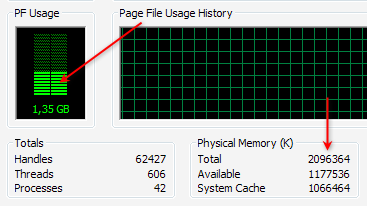
Many of the least amount of RAM / memory that we use can not be made a standard equal to one computer to another computer or even the operating system. Although when it will install Windows, there is a minimum specification of RAM, but the type of application that we use must also be taken into account. To check, just open the Task Manager and in the Performance check the PF Usage and also showing the total Physical Memory Physical Memory (RAM) and the remaining available (Available).

If we are not running any applications, but the rest of RAM is more than half, usually the computer's performance will be slow, then it should be checked any application that uses lots of memory (RAM), generally can be checked at the Process , Mem Usage column . If indeed we are barely adequate RAM (eg Windows XP with 512 MB of RAM or less, windows 7 with 1 GB of RAM), then the cheapest solution is to reduce the applications that consume a lot of memory. The best solution is to upgrade memory (RAM) (read: Know what RAM).

6. Conflicts applications or programs installed

Not infrequently two applications in the same category could result in conflict, further slowing computer performance. Signs of conflict forged the troubled computer after you install the software, whereas previously there was no problem. What often happens is usually in the category of conflict security software, such as antivirus.
For example we use 2 antivirus or more. Although some antivirus can run concurrently, but still not recommended, except for expert users or for trial. Not to mention when it still had to install other security software.
If there is an alternative variety of similar software, then if possible choose one that can represent, and superior in performance and results. Especially for the many types of software to access the resources or the operating system.


7. Selection Software inappropriate

Not a few people just went along with (trend) in the use of software, but there is actually a desirable feature in other software that is small and free. If we are indeed minimal computer specs or we want to work quickly, then choose the right software. Software with a large size is not always better and more appropriate for each of us. Here are some examples:
When we just want to burn data to CD / DVDs, exact solutions can use ImgBurn software that measures just about 5 MB or other free burning software that is relatively smaller than installing Nero Multimedia Suite which is about 354 MB.
When we work with compressed data (zip, rar), free software like 7zip that measures just about 1 MB should suffice, rather than install Winzip 15 measuring nearly 13 MB and is also not free (free compression software, etc.)
If using Photoshop 7 or CS1 / 2 is sufficient for the needs of graphics, then install Photoshop CS5 need difikir repeated, because the required specification is quite high, so it can work more slowly.

8. The amount of software installed

Although the software is installed is not running behind, but almost every software always adds an entry (data) to the registry, so that more and more software is installed is the size of the registry (windows) will also be greater. Because the registry will be accessible both when the computer is running and is already running, the size also affects the speed / response time was.
The solution is to use software that's required course, Uninstall software that is not important and use the uninstaller like Revo Uninstaller to make the process more thoroughly uninstallasi. To clean the software has been uninstalled on, can also use a variety of free Utilities.

9. Effects of excessive use of Windows

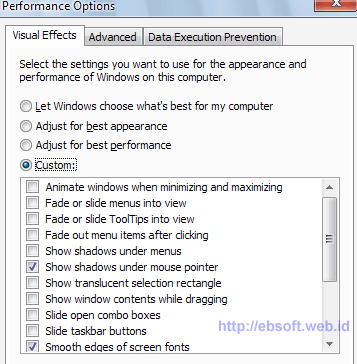
The use of Windows berlebihWindows Securities Xp, Vista and Windows 7 provides the option to use a display with various effects. If your computer has good specs, of the various effects is not a problem, but if you want faster performance, the effects of windows can be deactivated.
For example Windows XP, right-click My Computer, select the Advanced tab and click the Performance setting. We also put through the system tweaked to get the settings right and quickly, using software such as X-Setup Pro.


Actually, in addition to the above 9 things are still many other reasons, such as various service windows that are running are actually not necessary, selection and arrangement of hardware that is not optimal, the primary disk space (for example, drive C:) which limits or on the verge of running out, and others (ebsoft)

Mobile Banking Security

Any bank or credit union is a good deal to offer mobile banking. This is because customers demand it, people can pay their bills and balance will see, among others. Very few people, especially the younger generation do banking the old fashioned way. Some have even started a service that offers to scan checks for deposit upload.

Therefore, almost all banks, including large and small species, some mobile banking. This is obviously great, but the security of mobile banking is often overlooked because they implement the changes quickly. Bank has a lot of sensitive data, it is important that security very seriously. Not only that, but some high-profile banks have been kidnapped in the past. Bank is a target for hackers, not only for the information they hold, but others do it for political reasons.

Measures that exist in most banking sites implemented. Usually they go for a regular user name and password. Some require a code every time you login from a new location, make sure you access your personal e-mail or telephone. This is a step to verify who you are. Others have a security question you need answered. The answer is given when the user logs on. This of course saves the problem. Others require a password that is easy to guess, which consists of random letters and numbers, uppercase and lowercase letters. Some even require you to change your password periodically.

Of course, the best mobile banking security will be compromised because it does not really sure. But if the right steps taken, he would ensure that the bank may not be aligned. Customers should think in the end, even as they do not share the password with others, and use a secure connection. It would be very easy for someone to get a WiFi hotspot banking password. Customers also need to ensure that they log out of the machine together.

Mobile banking security should not be overlooked. If the site is entered directly and successfully. To open a bank for a lot of obligations. If, in addition to high-profile cases make the news, many customers lose confidence in banks and bank accounts more closely and elsewhere. Customer data is exposed to a public relations nightmare and should be avoided at all costs.

Mobile technology e-commerce to mobile banking

As with any business, banks too have felt the increase in sales-generation mobile technology, and turn back from that e-commerce solutions provider for the banking sector before. With the availability of the Bank in relation to financial services through smart phones, has been named the new banking technology in the banking sector, mobile reach the milestone.

Mobile banking and mobile banking and more popular among banks in the world, because it is proven to generate additional revenue while reducing cost and demanding technology needs of customers. Customer, the best solution, because the technology enables secure mobile banking service financial transactions, even on untrusted networks.

Planning with the advancement of mobile technology, customers, banks and their strategies on the road with a sense of security. In a survey of empirical studies have found that the profits of the banking sector by weight of the three types of people.

Target three mobile banking technology is:

Little kids: Adolescents in the overall analysis can contribute to the relevant income or financial contributions, but they were determined that the bank's economic future as part of this technology upgrade. School groups would be "entrepreneurs and professionals who are used throughout to calculate and certainly hope that the banks are dealing with a single click or touch. So should the banking sector, customer habits and behavior of their future success followed by long-term to develop mobile banking.

Young Professionals: stable is recognized by many of their financial situation, but then, this scenario is just a password with the bank group and professionals need to consider their behavior or activity to convert them into future loyal customers, they make an important contribution to get bank earnings. Young people put the effort and innovation as a technically demanding than the previous group, but also sensitive when it comes to monetary assets at financial institutions trust. They must develop a strategy for the bank, an investment in the future to allow the core group of viewers.

Business Customers: No doubt, entrepreneurs from around the recesses of the inspiration for the banking sector. They have the knowledge, time conscious and economically. This group of people looking for practical guidance to banks and financial transactions on their investments and funds. Mobile devices as a means to transfer funds between accounts of individuals is something that this group would be interested, and this demand is met, trust bankers and gain commitment of people in business class.

Help for all the endless demands of a diverse group of mobile banking solutions for the banking sector in the mCommerce-by-step restriction barriers, demographic and geographic intensity to overcome the causes of the banking sector for bank employees, arising from the quantity of heavy printing currency. Mobile banking is a safe choice when it comes to exchange transactions in the technology actually encouraged through cross-border financial transactions. Android, iPhone, Blackberry and Windows Mobile 7 is some of the best mobile operating systems in which the bank will be made in connection with mobile applications.

Five tips to ensure your laptop

It is important to keep your laptop safe because it can be damaged, lost or stolen, you too. At that time the game is more likely to cause an impact on you in terms of funding to do it because you have installed the device and replace all the software. This affects also in terms of time, because there are no data on the laptop.

It is important for laptops and five tips to ensure your laptop to minimize the impact on the hatch.

  1. The first tip, if your laptop to make sure that it is backing up your data before you have with him. If you already have security software on the laptop, it can also be a feature that you should back up data to disk or server cloud.
  2. The second end for securing the laptop is to have a secure password and ensure that people can not access their personal data. Try a password at least 8 characters and the use of uppercase and lowercase letters, numbers or a combination of this set.
  3. The third tip is to have a laptop bag that can be posted on the Internet or purchased from a retail computer store. May have to offer in a laptop bag that protects it from knocks and blows, and how easy to transport. The best way is a backpack that looks like a less visible, if someone with him in public. Important for the slider and the bag in the compartment and padding.
  4. The fourth tip: To make sure that you keep your laptop with you at all times, because if you leave the place, there is some risk that this could be stolen or you forget where you put it.
  5. The top of the fifth and last keep your notebook would not use it in public, because it can be seen by thieves. If you use a laptop in public, then you better do it from a quiet place. Hopefully the thief to steal your laptop, if they delayed any longer so expensive.

Save on your laptop is one of the UK's leading specialist in portable computers. This is the only online retailers to keep prices low. This site is maintained by Box Limited, an established company formed over 16 years.

Computer Repair Advices and How To Find A Computer Shop

Computer problems can be tricky. Sometimes they occur without warning. Problems can arise surge, hardware failure, virus, etc. We believe everyone should have a backup system. Whether you subscribe to an online backup system, only the option to purchase, or external hard drive and install it, we must always keep a copy. Computers are cheaper, most of the time you have a new computer rather than being able to buy hundreds of dollars on computer repair services. Sometimes hardware failures can occur and that the computer can still work. This is a difficult situation, because the computer can spend a lifetime. If this happened is still very important to solve the problem immediately. Imagine visiting a friend or just a clever computer repair shop. Currently, the data service provides a free diagnosis.

In other cases, a hardware failure can be so obvious that there is no doubt that you have to go to computer store (the line across the screen, the computer is off, the hard drive is strange noises, etc..) The virus is also something you should know. We must have all antivirus systems proposals. Yes! Do you have two or three or more! One of the most anti-virus is enough! Some viruses are much more than appears on the screen when you try to do something. The virus is very annoying, but at least we know that your computer is infected and needs to take action as soon as possible. Most of the computer shop to fix the problem.

In some other cases, a laptop or a computer that can be a sign that you can check your computer against viruses. Maybe if you see a blue screen and rebooting several times when some software.

For someone who is not sure how much could cost a little when it comes to PC problem - it's easy to find food. This way, you know what it will cost and when he can expect to make repairs. Something that can be very important if you understand your own business or work only on a computer on a daily basis.

Computer workshop is important for all of us as technology continues to consume our lives. It is important that you seek to find a reliable computer near you for a repair. Reasonable, fair and able to explain what is happening on your computer if they do little on the web in advance. Not be fooled by websites that are full of technical jargon, and tons of stories in society. To find PC repair, you need balance. Someone who is professional, technical, and that the computer can be connected to each user. Be careful with the service you received and an explanation was satisfactory. To be in control of services and ensure that your computer has been done and that you understand what that means. When you save a reliable computer, you will always be those associated with any computer problem.

If not help, please visit http://www.southfloridapcrepair.com on any computer or service information technology Broward County in South Florida.

I Zica Daniel, owner of PC Repair South Florida, located in Fort Lauderdale, at: 4407 North Federal Highway, Fort Lauderdale, FL 33308, I worked with computers since the beginning of high school, he 20 years ago. My company is using a computer-related services in South Florida, including computer repair and service, office, server, web design, programming, cable, network. You can reach us at: 954-934-5342

Protects your PC on infected e-mail

Here are some simple rules to reduce the risk of playing into the hands of the virus infected e-mail
  1. Consider all business and personal emails as potentially dangerous. If ever in doubt, delete it!

  2. The "From:" field can be easily faked to look like it came from someone or a business you have dealt with. If a friend or business, that you deal with, gets a virus infection, it can make a copy of their email contact list, and send email to all people in that list.

  3. Be very suspicious of any email with no subject or "RE:" as the subject. A "RE:" should always have the subject of the reply following it.

  4. Be very suspicious of any email with no textual content and only a website link or attachment. Attachments can contain dangerous links to virus infected sites or an infected software executable. This is a file that once it is double clicked, can plant dangerous spyware or install malicious software.

  5. Do not click on a link or attachment unless you were expecting an email from the sending person.

  6. If you aren't sure about the email, it might be a good idea to call the sender. If they didn't send the email, ask them to quickly change their email account password and have their computer scanned for viruses and spyware. You should immediately delete the email.

  7. To reduce the risk of your email contact list from being used to perpetrate one of these nasty email crimes, make sure you use a strong password to protect your email account. Short and simple passwords are easy to break. Secondly, install a quality antivirus software on your computer. Most people, who come into our Fort Collins, Colorado office, with a virus infected computer, were using the antivirus software, provided free, by their Internet service provider. We have found that the "big" name antivirus companies produce weak antivirus protection and also slow down your computer.

Comparison of transportation management software for 3PL

A Transportation Management System (TMS) is positioned between an Enterprise Resource Planning (ERP) system and a shipping distribution model (e.g. TL shipping). There are three ways a shipper can implement a TMS:
  • Create a TMS in-house
  • Outsource the TMS function to a Third Party Logistics (3PL) provider
  • Use transportation management software
Large shippers that operate a shipping fleet usually create a TMS product in-house, while small shippers that do not own a fleet normally outsource the TMS function to a 3PL provider, or implement a TMS product - a type of logistics software that allows shippers to perform a freight audit as well as other logistics functions without staffing logistics experts, or contracting with a third party.

TMS Software versus 3PL
Depending on the wants and needs of the shipper, both TMS software and 3PL have unique advantages. When comparing a TMS product to a 3PL, the advantages of each-pertaining to cost, control, and carrier options-can be summed up as follows:

Cost
The cost of 3PL depends on the type of provider a shipper uses - a standard 3PL provider, a service developer, a customer adapter, or a customer developer. Standard 3PL providers and service developers offer a limited range of standard logistical services and a limited range of value-added logistical services, respectively. Therefore, they are not a logical choice for TMS management. That leaves customer developers and customer adapters, both of which perform comprehensive shipping management.
Compared to the cost of transportation management software, the cost of using a customer adapter or a customer developer can seem exorbitant. Although the management function is outsourced, it is still handled by logistics experts, who earn an average salary of $75,000-$90,000 a year.

Control
Outsourcing the TMS function to a 3PL provider relieves the shipper of controlling the function directly. This is what some shippers want, but for shippers preferring to perform their own freight audit and enjoy having control over the shipping process, using logistics software creates a happy medium. This is because it eliminates the cost of maintaining an in-house logistics department, yet it allows the shipper to control the TMS function within the company.

Carrier Options
TMS software supplies shippers with the largest number of shipping options. The number of shipping options that a 3PL provider considers is often unclear. Some providers use electronic posting systems that match available loads with available carriers, while others have beneficial business relationships with a select group of carriers, and use them for the majority of shipments. Using logistics software instead of 3PL is known to reduce shipping costs by ten percent in the first year, and the broader range of carrier options it supplies is one reason why.

Conclusion
Transportation management software provides a cost effective way for shippers to perform a freight audit along with other TMS functions, particularly when compared to maintaining a TMS product within the company. Outsourcing the TMS function to a 3PL provider is also less expensive than the in-house approach, but it does not offer the same flexibility as TMS software in terms of cost, control over the shipping process, and carrier options.

What are Facebook and cover how they are used?

In the world of social media has become the fastest growing media around the world during the past two years. Friends and family can see and hear everyone in the world second. Powers such as Facebook, Twitter, MySpace and Gtalk have done a lot with each other to increase their availability through the Internet connection. The world has become a global village, and reach out to anyone in the world, can be done in a fraction of a second.

The social media world itself is in progress and many applications and devices, are better equipped to users. Billions of users have joined these forums and programs that are constantly released, free to use. Most of them can be downloaded from various websites and is used at the pleasure of anyone.

Facebook is one of the most important of these social media sites. His fame grew in large areas and reach more people worldwide than any other platform social media. Add to Facebook is free, and each member has a profile page. Here you can share their thoughts with friends and family. It provides an opportunity for real-time chat, use it on someone's profile or on your own profile page. In this way, you always know how to have your friends and family, and plan future events.

Recently introduced Facebook an attractive way to focus on the wall of a person. The scenario is one of the functions introduced by the user. It uses Facebook roof, which can be downloaded from some sites. This includes a variety of styles and stunning images to make selections. The screenplay focuses not on the wall to be a banner with a sequence of events that happened in your life. If you are a Facebook user and you decide to switch to the Timeline, you will notice that your comments and status updates in the form of a series of events that took place in your life. This is not only very creative, but it is a good way to keep track of your activities as you progress through life.

Facebook blankets can be compared with the first few pages of a public newspaper. They can be downloaded directly to your schedule and used according to your wishes. In fact, you can give one of the subscribers, the cover image for people to download. It can be a great way to make money.

How to Protect Your Business Website From Malware Attacks

Virus attacks are finally online experience unpleasant tasks. So if your main concern is the growth of e-commerce, the installation of the best malware protection software. According to sources, the individual company websites 25 years landed a black blogged online and get stronger as a result of malicious attacks. Contractor has a number of pictures that stand out from a number of local residents in a luxury fundraising, but as participants go online to find a picture of them, they were warned for their safety by their Internet browser online site.

Although it is very embarrassing episodes, can be expressed as a bad time, because owners are invested in the software download the best antivirus. He does not realize the importance of installing the software to remove malware and make the site safe. Please note that the ability to hack computers is reduced automatically by the operating system's antivirus program is strong, and hackers are now targeting small businesses online.

If an infected site may harm your reputation and business customers, it is important to protect your business and clean up the attack is made. Google blacklist of 6000 websites infected with malware every day, so if your visitors are infected and you may be used without proper installation of the removal of malware. Malware can visit the company website using a variety of routes that weak passwords that can be easily translated and helped visiting an infected site is included. The owner of a typical web site does not need to know that his place of establishment is infected by malware. And this can lead to users and retail banking, direct visitors to strip porn sites.

Read about how your website to protect against malicious software attacks online ::

A. Make sure your antivirus program updated and verified attacks, more dangerous line.
Second install the appropriate security patches and antivirus programs because they help maintain security of your system and help keep your system updated.
With the third fastest time in the viral safety program by selecting the best program for the maintenance of security on your site.
Fourth Create a password that is extremely useful to help better protect your files and folders on your system.

Keep in mind that small businesses are vulnerable to malicious attacks online. Install anti-malware or spyware that the dynamics and limitations of the filesystem that can squeeze begins.

How To Find Registry Cleaner

Most people know the importance of the evaluation system registry cleaning software did not notice before making a purchase. There are many features you should look before you decide on this matter.

Great backup tool - A tool registry without a backup feature in his toolbox is a clear sign that you want to stay away from this program. The power that these programs should support the operations of the computer to change, the need for a backup. This way, you can always return to the starting point after playing with the program.

Search system optimization tools - An expert in optimization capabilities of the system can boot your files, the object browser, office extensions and optimization applications for managing Windows. If you are a lover of the game, these applications convoluted with the system registry keys and empty files, a program that quickly Reg set the click of a button to optimize.

Do a scan function optimally - One of the most overlooked features of the registry is the award-winning quality scanning application. You can select one of the best programs to register on the web to clean, but if the analysis is incorrect, then the purchase is virtually useless. Remember that these programs are used only for registry errors found on the first scan to correct the software.

Ability to integrate with the browser: Bonus - Often the best programs on the market are able to optimize the way your computer communicates with browsers such as IE, Firefox and Chrome (among others). This will only improve the user experience with these programs and allows the PC to run faster and error free.

Another point to keep in mind when looking for the first free registry cleaners on the market is not truly free. Most of these applications allow you to download their product and a free analysis of your computer to use it to show that there are huge errors on your hard drive. When you click a function to correct these errors, it is generally necessary to register the software - often associated with the purchase of this particular version of the product.

So, knowing that they are forced to at least something to pay for a program of upper register, there are few things sure to select the right one for you and your pocket. Make sure you try to get more than a registry cleaner to evaluate before making a purchase. In this way, the amount of features and benefits (some of which are above), compared with the price of membership. Certain periods of the trial offer where you can test their product for a limited time. Others force you to buy the product for the use of their software applications.

This information must educate the details of what to look for in your quest for the registry cleaner free top right. You will find that these steps for each product evaluation will help you find the right one for you and your PC. Most times it will register the first and only tool necessary for the optimal online experience to be.

I have an internet marketer over the last 4 years and I could not begin to number of software applications and that is uploaded and downloaded on my home PC and laptop to disclose. Without a guarantee of the right Registry Cleaner Free Best works. I knew a delay, accidents and ongoing problems with the functionality of my computer.
 
 
Blogger Templates